
Photo calendar size guide: inches, pixels and press sheets
Pick the right photo calendar size for your lab: desk and wall sizes in inches, pixels at 300 DPI with bleed, and how many pages fit on a 13x19 sheet.
Short answer
- The usual desk calendar sizes are 8x6 and 6x8 inches, with 8x4 as a slim desk option. 12x18 inches is a common wall size.
- At 300 DPI, multiply inches by 300: an 8x6 page is 2400 x 1800 pixels, or 2475 x 1875 pixels with 0.125 inch bleed on every side.
- Check resolution at the photo box size, not the page size. A photo that fills an 8 x 3.5 inch box needs about 2400 x 1050 pixels for 300 DPI.
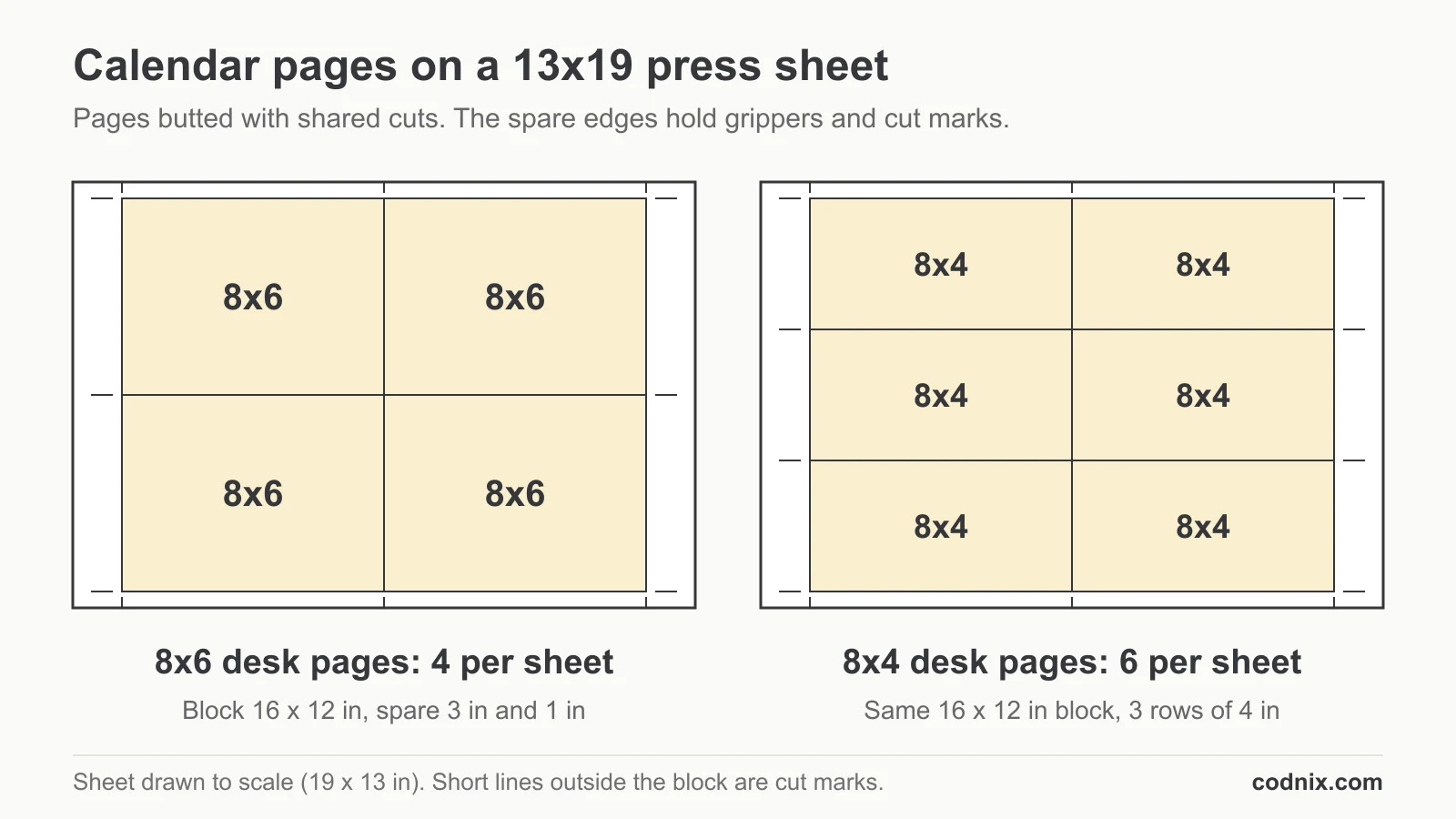
- Four 8x6 pages or six 8x4 pages fit on a 13x19 sheet when the pages are butted with shared cuts.
The right photo calendar size for a lab is the one your binding, paper and press sheet handle well. Common choices are 8x6 or 6x8 inch desk calendars, 8x4 for a slim desk version, and 12x18 inch wall calendars. Set every page at 300 DPI with 0.125 inch bleed, and check each photo at the size of its photo box.
If you are getting calendar files ready for the November to January rush, the numbers below should help the first print come out right.
Which photo calendar size should you offer?
Start from what your customers put on a desk or a wall, then from what your binding setup can handle. A spiral or wiro desk stand takes small wide pages well. A wall calendar needs a bigger page and a hole or hanger at the top.
| Calendar | Size (inches) | Typical use |
|---|---|---|
| Desk, wide | 8x6 | The usual photo desk calendar, one photo per month |
| Desk, slim | 8x4 | Office desks, corporate gifts, lower paper cost per piece |
| Desk, tall | 6x8 | Portrait photos, couple and baby calendars |
| Wall | 12x18 | Family and wedding calendars, bigger photos |
Printers abroad work with other sizes. 4over4, a US print company, lists a wall calendar that is 11 x 8.5 inches folded and opens to 11 x 17. It also lists a 12 x 12 inch square, and standing desk tents of about 6 x 8.5 or 5 x 7 inches. If a customer brings a design made for one of those, resize the design. Don't squeeze it onto your page.
Keep the list short. Three or four sizes you can print and bind every day are easier to run in the season than ten you make twice a year.
What size in pixels does a calendar need at 300 DPI?
Pixels are inches multiplied by the resolution. Print companies ask for 300 DPI: the 4over4 calendar spec asks for print-ready PDFs "at 300 DPI or higher" with 0.125 inch bleed on all four sides. Bleed adds 0.25 inch to the width and the height.
| Page | Trim size | Pixels at 300 DPI | With 0.125 inch bleed |
|---|---|---|---|
| Desk, wide | 8 x 6 in | 2400 x 1800 | 2475 x 1875 |
| Desk, slim | 8 x 4 in | 2400 x 1200 | 2475 x 1275 |
| Desk, tall | 6 x 8 in | 1800 x 2400 | 1875 x 2475 |
| Wall | 12 x 18 in | 3600 x 5400 | 3675 x 5475 |
| A4 page | 8.27 x 11.69 in | 2480 x 3508 | 2555 x 3583 |
Use the calendar size in pixels for the background, frames and month grid. Customer photos can sit below 300. Nations Photo Lab, a US photo lab, says images of "125 PPI or higher print beautifully" and shows 300 PPI as its top tier. On a calendar, where people look at the page from a desk or across a room, 150 to 200 PPI on a photo usually prints fine. Below about 125, faces start to look soft.
Check the photo box, then the page
A calendar page is mostly photo, plus a strip or block for the month grid. The photo only needs enough pixels for its own box.
Say your 8x6 template has a photo box of 8 x 3.5 inches above the dates. For 300 DPI the photo needs about 2400 x 1050 pixels. For 150 DPI it needs 1200 x 525. Almost any phone photo from the last few years has that.
The photos that cause trouble are usually these:
- Photos forwarded on WhatsApp, which are often compressed and smaller than the original. Ask the customer for the original file, or a Drive link.
- Tall photos in wide boxes. A portrait photo in an 8 x 3.5 inch box gets cropped hard, and you lose heads or feet. Use a 6x8 template, or move and zoom the photo before you print.
- Screenshots, which are the size of the phone screen at best. One might work for a small box and fail on a 12x18 wall page.
Bleed, safe margin and cut marks
Calendars are trimmed after printing, and the cut can drift a little from sheet to sheet.
Bleed covers that drift. Let the photo and background run 0.125 inch past the trim line on every side, so a slightly off cut still shows colour at the edge.
The safe margin keeps important things away from the cut. 4over4's guide asks you to keep dates and text "inside a safe margin"; about 0.25 inch from the trim works for the dates, month names, studio name and order number.
Cut marks are short lines outside the page that show the operator where to cut. They need room on the sheet edge, which is why the sheet layout below leaves a spare border.
On a wiro or spiral desk calendar, keep the top strip where the holes are punched free of dates and faces.
How many calendar pages fit on a 13x19 sheet?
Digital presses commonly run 13x19 or 12x18 sheets, and offset jobs often go on 20x30. Calendar pages are often butted together with one shared cut between them, so the whole block needs bleed only on its outside edge.
| Page size | 13x19 sheet | 20x30 sheet |
|---|---|---|
| 8x6 or 6x8 | 4 per sheet (block 16 x 12 in) | 9 per sheet (block 24 x 18 in) |
| 8x4 | 6 per sheet (block 16 x 12 in) | 14 per sheet (block 28 x 16 in) |
| 12x18 | 1 per sheet | 2 per sheet (block 24 x 18 in) |
These counts are simple arithmetic on the trim size. On a 12x18 sheet, the same 16 x 12 inch block leaves no edge at all, so you may fit only two 8x6 pages there. Check your press's printable area and gripper margin before you promise a count to the customer.
A 12-month desk calendar with a cover is 13 pages. At 4 per sheet that is 4 sheets per calendar with 3 spare slots. You can fill those with the next order's pages if you print several orders together. Getting that order right by hand is slow and easy to get wrong. This short Hindi tutorial shows Quick Calendar placing the pages on the print sheet by itself:
A file checklist before the calendar goes to print
Run through this for every calendar order, or make it part of your template so it happens by itself.
- Page size matches the size the customer ordered, with 0.125 inch bleed.
- Every photo is at least 150 PPI at its box size, and the faces look sharp at 100% zoom.
- No face or date sits in the binding area at the top.
- The start month and year are right. Some business customers want April to March.
- Holidays and festivals are marked for the right year.
- The studio or lab name, if you print one, sits inside the safe margin.
- The PDF is imposed on your sheet size with cut marks, and named with the order number.
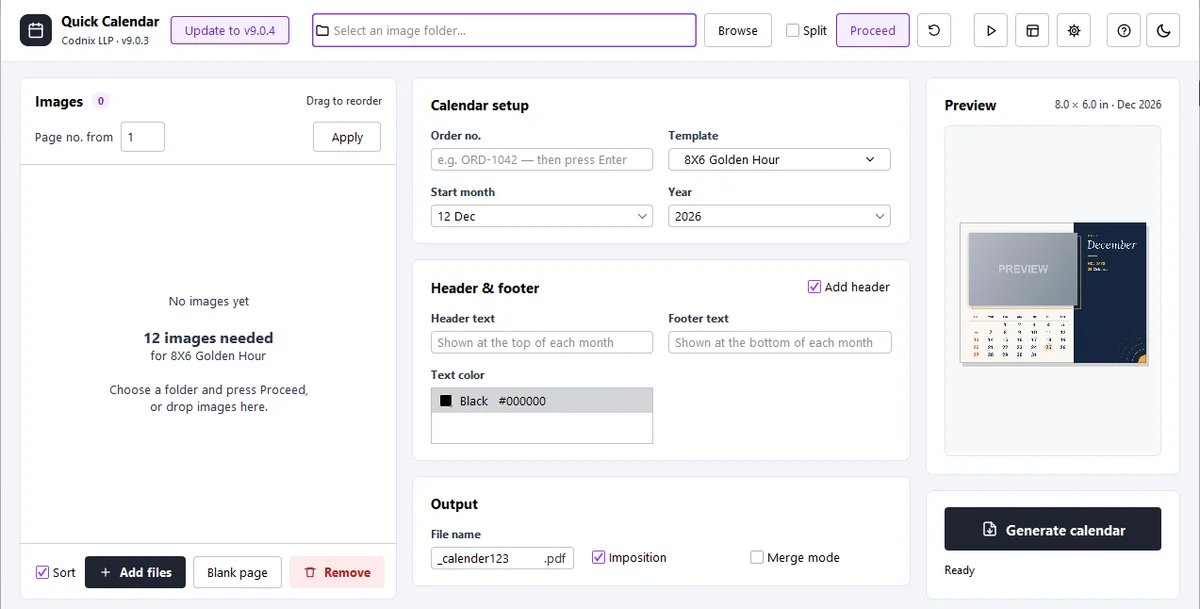
If your lab makes many calendars each season, a tool that keeps the size, sheet and cut marks inside the template saves time on every order. Quick Calendar is Windows software that does this. Its library includes 8x6, 8x4, 6x8 and 12x18 templates. It lays pages out on 13x19, 12x18, 20x30 or custom sheets with cut marks, and its photo-fit check flags photos that would be cropped badly before you press Generate.
Album files work the same way: page size, bleed and sheet layout first. See Quick PDF Generator for album and photobook PDFs, and the full set of tools for photo labs and print shops.
Making calendars for the new year? Try Quick Calendar free for 15 days.
Frequently asked questions
What is the standard size of a desk calendar?
There is no single standard. Common photo desk calendar sizes are 8x6 (wide) and 6x8 (tall), with 8x4 as a slimmer option. Printers abroad also list sizes like 5.5x8.5 and 6x8.5 inches.
What size in pixels should a calendar page be?
Multiply the size in inches by 300 for print quality. An 8x6 page is 2400 x 1800 pixels and a 12x18 wall page is 3600 x 5400 pixels, before bleed.
What DPI do I need to print a photo calendar?
Aim for 300 DPI at the printed size of each photo. Many labs accept less: Nations Photo Lab says images of 125 PPI or higher print well, so treat 150 as a working floor for customer phone photos.
What is bleed in calendar printing?
Bleed is extra artwork past the trim line, usually 0.125 inch on each side, so the cutter never leaves a white edge. Keep dates and text inside a safe margin away from the trim.
How many calendar pages fit on a 13x19 sheet?
Four 8x6 or 6x8 pages, six 8x4 pages, or one 12x18 page, with the pages butted together and the spare edge used for grippers and cut marks.