
Cut and stack printing: numbered tickets that stay in order
How cut and stack printing works for numbered tickets, coupons and bill books: the page order, the arithmetic, the cutting steps and the mistakes to avoid.
Short answer
- Cut and stack printing lays out numbered items so that, after the sheets are cut, each pile is already in sequence. You put the piles on top of each other and the whole job runs 1 to the last number.
- Each slot position on the sheet becomes one pile. With 400 tickets at 4 per sheet you print 100 sheets, and the first slot carries 1 to 100, the second 101 to 200, and so on.
- It suits raffle and event tickets, coupons, vouchers, token slips, bill books and any job where the numbers must come out in order without hand sorting.
Cut and stack printing is the layout print shops use for numbered tickets, coupons and bill books. The numbers are placed so that each slot position on the sheet becomes its own pile in sequence. You print, cut the whole stack once, put the piles on top of each other, and the job runs from the first number to the last without anyone sorting tickets by hand.
If you have ever had two staff members sitting on the floor sorting 5,000 raffle tickets the night before an event, this post is for you.
What is cut and stack printing?
On a normal multi-up sheet, pages go in reading order. Sheet one carries tickets 1, 2, 3 and 4. Sheet two carries 5, 6, 7 and 8. When you cut that stack, the top-left pile holds 1, 5, 9, 13 and so on. Every pile is a mix, and someone has to collate them.
Cut and stack changes the order. The numbers run down through the stack of sheets, not across each sheet. The help pages of one widely used print-server workflow describe it as laying out pages so sheets can be stacked and cut, then the piles stacked again with the records in sequential order, with no extra sorting.
Jobs where this layout saves the most time:
- Raffle, lucky draw and event entry tickets
- Coupons, discount vouchers and gift vouchers
- Token slips for canteens, temples and clinics
- Bill books, receipt books and challan pads with printed serial numbers
- Numbered labels and tags for stock or courier parcels
- Name cards or certificates printed from a list, when they must stay in list order
How does cut and stack numbering work?
The working is simple arithmetic. Take the total quantity, divide it by the number of tickets per sheet, and round up. That gives the number of sheets, and also the size of each pile.
Example: 400 tickets, 4 tickets per sheet.
- 400 ÷ 4 = 100 sheets, so each pile will hold 100 tickets.
- Slot 1 on every sheet takes tickets 1 to 100. Sheet 1 gets ticket 1, sheet 2 gets ticket 2, and sheet 100 gets ticket 100.
- Slot 2 takes 101 to 200, slot 3 takes 201 to 300, and slot 4 takes 301 to 400.
- So sheet 1 carries 1, 101, 201 and 301. Sheet 2 carries 2, 102, 202 and 302.
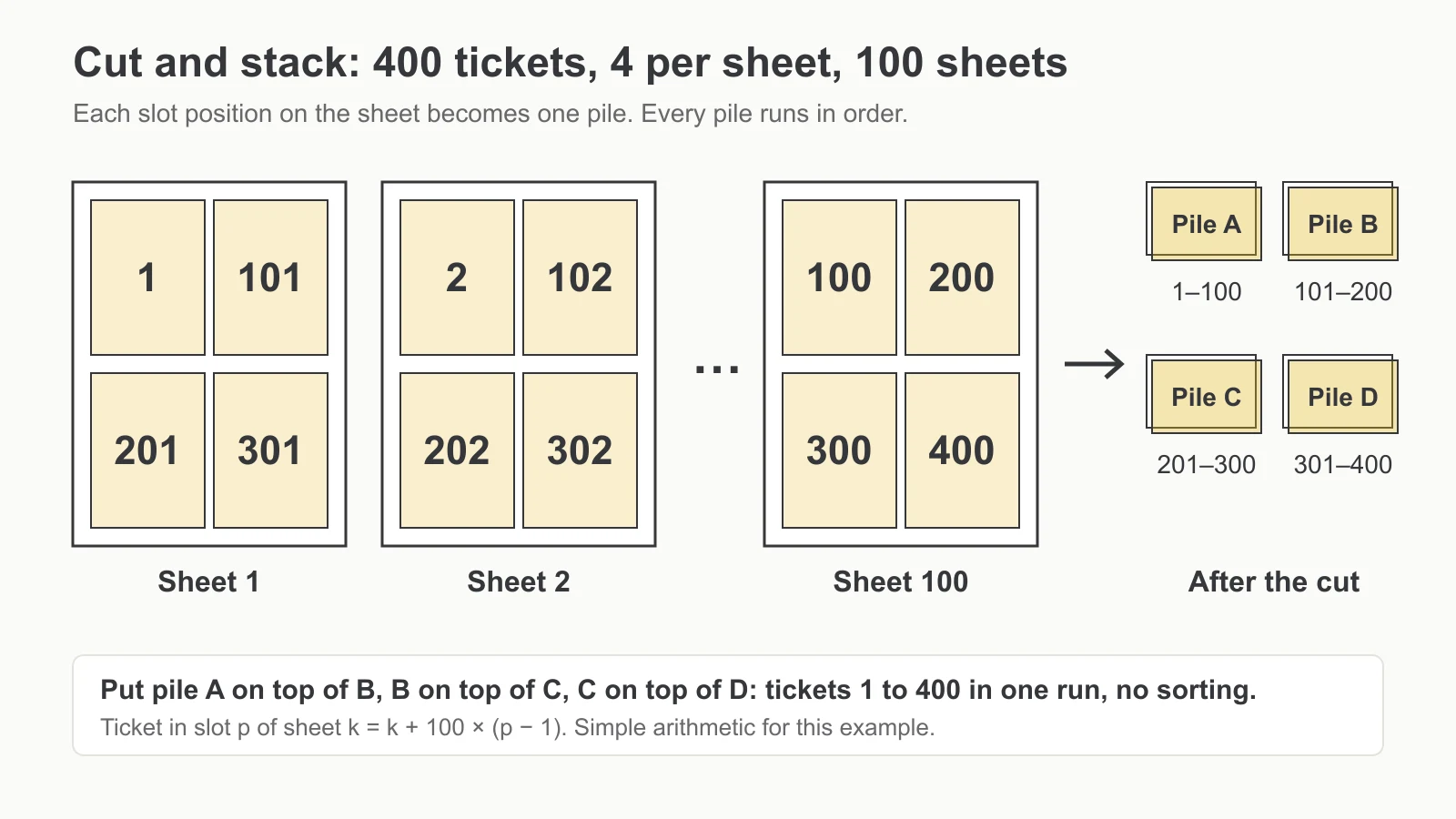
After the guillotine, you have four piles. Put pile A on top of pile B, B on top of C and C on top of D, and you are holding tickets 1 to 400 in order.
The same idea answers a question that comes up often on design forums. In a design-software forum thread about numbering 20,000 tickets, the suggested method was the same: divide the total by tickets per sheet, then build a data file where each column runs down in sequence. That works, but building and checking that file by hand for every job is where mistakes creep in.
When the total does not divide evenly
Say the customer wants 1,000 coupons and you fit 6 on a sheet. 1,000 ÷ 6 = 166.7, so you print 167 sheets. The piles hold 167 numbers each, and the last pile is short. Its last few slots are blank or carry numbers past 1,000. Decide before printing which one you want, and tell the operator so the extra pieces are thrown away and not packed.
Cut and stack printing step by step
Here is the order of work that keeps a numbered job clean in a busy shop.
- Get the artwork without numbers. Ask the designer for the ticket design with a clear empty box for the number. Numbers are added at the imposition stage, not typed into the design one by one.
- Fix the trim size and bleed. A typical visiting-card-size ticket is 90 x 54 or 90 x 55 mm. Add bleed if the design runs to the edge.
- Work out pieces per sheet. Check how many fit on your sheet with gutters and margins for the cutter. Leave room for cut marks.
- Set the numbering. Start number, end number, step, any prefix such as "A-" and zero padding such as 0001. Confirm the range with the customer in writing.
- Impose in cut and stack order. Check the first and last sheet on screen: sheet 1 should start each pile, and the last sheet should end each pile.
- Print one proof sheet. Check that the number sits inside its box, and that front and back line up if the job is two-sided.
- Print the run and keep the stack in order. Don't shuffle sheets after a paper jam. Put reprinted sheets back in their place.
- Cut, then stack the piles in order. Pile A on top, then B, then C. Band each bundle with a slip showing its first and last number.
For a two-sided ticket, such as one with terms printed on the back, use work and turn or work and tumble. The back of each ticket then lands behind its own front after cutting. Always cut one test sheet and hold the front and back together before you run the full quantity.
Large jobs: split into batches
A guillotine can only take a stack of a certain height. For 20,000 tickets you may have more sheets than your cutter can handle in one go. Print-server software handles this with a "stack size" option that splits a large job into smaller batches, each imposed in cut and stack order on its own.
You can do the same by hand. Split 20,000 tickets into four jobs of 5,000, impose each one separately, and cut and band each batch before starting the next. Each batch stays continuous, and a jam or misprint only affects one batch.
Which jobs should not use cut and stack?
Cut and stack is the right choice when order matters. When it doesn't, a simpler layout is faster.
| Job | Better layout | Why |
|---|---|---|
| 500 identical visiting cards | Step and repeat | Every slot has the same card, so order does not matter |
| A 16-page brochure | Saddle stitch (booklet) | Pages must pair up for folding and stapling |
| 100 different wedding cards, one each | N-up | Each design is different and not numbered |
| 1,000 numbered coupons | Cut and stack | Numbers must stay in sequence after cutting |
| Bill book with 50 leaves per book | Cut and stack | Each book needs a continuous serial run |
If you want the basics of placing several pages on one sheet, our guide on what N-up printing is covers it with sheet counts for A4 and 12x18.
Common cut and stack mistakes in print shops
These are the problems that turn a two-hour job into a reprint.
- Numbers in reading order. Someone uses plain N-up or step and repeat with a counter, and the piles come out mixed. Always check sheet 2 on the proof: slot 1 should show the second number, not the fifth.
- Wrong pile size. The data file was built for 6 per sheet, but the layout was changed to 8 per sheet. Rebuild the numbering every time the layout changes.
- Sheets out of order after a jam. One sheet reprinted and placed on top shifts every pile by one number. Mark reprints and put them back where they belong.
- Duplicate or missing numbers. For lottery-style tickets or entry passes this is serious. Spot-check the first, middle and last number of every pile before packing.
- Grid larger than the sheet. If the rows and columns don't fit the print area, pieces run off the edge. Check the full sheet on screen, not just the first slot.
- Back side flipped. Work and turn and work and tumble flip the sheet in different directions. Cut one test sheet before running the job.
Doing cut and stack in PDF Imposer
Many shops still do numbered jobs by building an Excel file and running a data merge in their design software. It works, but someone has to think through the order for every job, and the mistakes above happen when that person is rushed.
PDF Imposer is our Windows imposition software for commercial print shops, and Cut and Stack is one of its seven imposition tools. You set the paper, item size, rows and columns, margins and gutters, and the default page order is sequential down the stacks, so each pile reads in order after cutting. A round-robin order is there too, for jobs that do not need it.
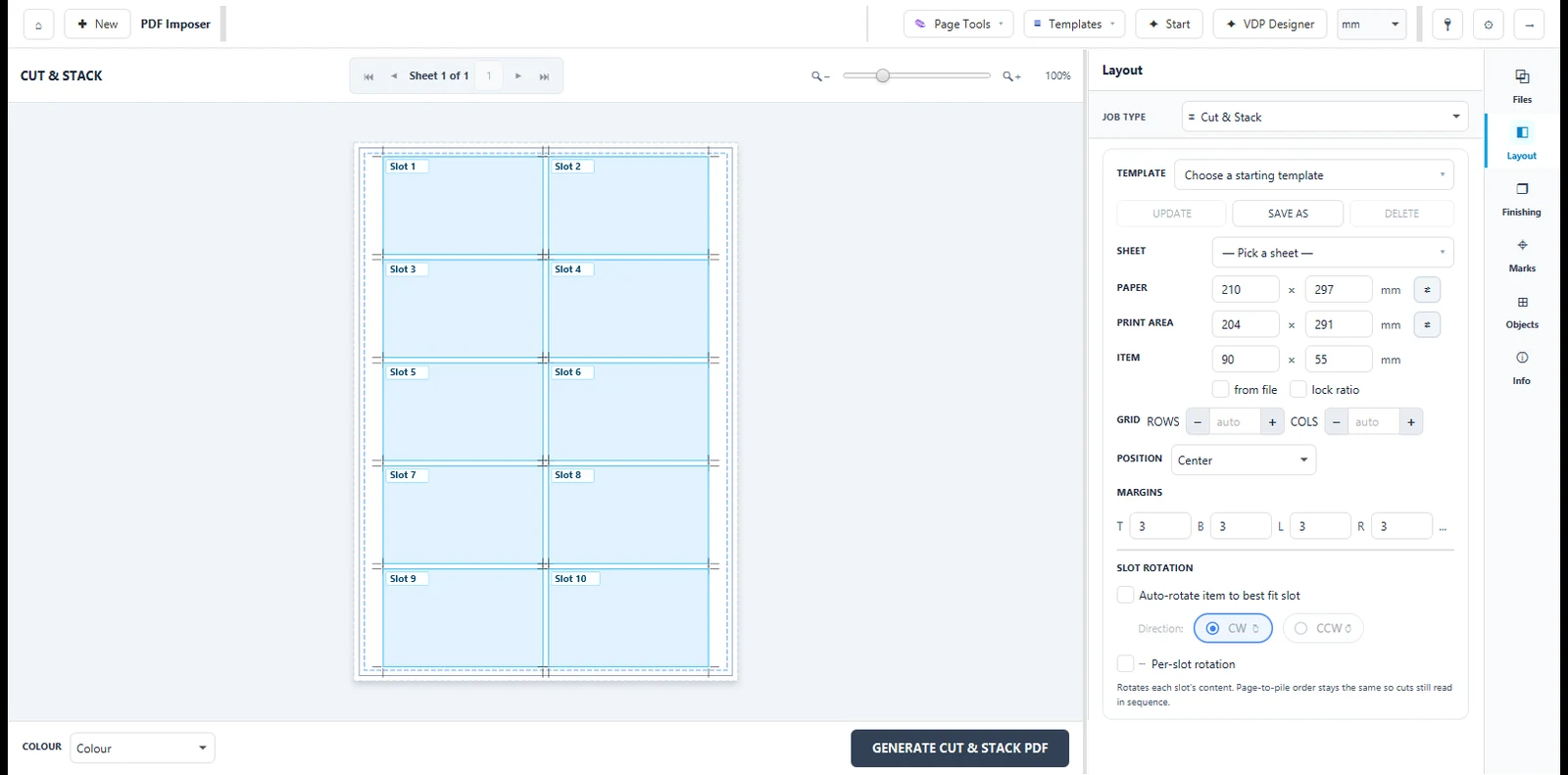
For the numbers themselves, the Objects section adds serial numbers with a prefix, suffix, start, end, step and zero padding. You do not need a data file for a plain ticket run: tick the no-data option, set how many copies you need, and the numbers are collated through the stacks for you. If the job has names or codes from a list, load the CSV or Excel file instead and the records follow the same order. A barcode can carry the same number.
A few other details help on the cutting table. A per-piece label can carry the pile number, so the operator knows which pile is which. An "outer marks only" option keeps crop marks off the space between pieces. Work and turn and work and tumble handle two-sided tickets. Once a ticket job is set up, save it as a template and the next order of the same size is a few clicks.
PDF Imposer also covers step and repeat, saddle-stitch booklets, N-up, gang sheets, tiling and covers. See how it fits a commercial printing setup, or the wider set of tools for print shops.
Have a numbered job coming up? Book a demo of PDF Imposer and we will set up a cut and stack template with you.
Frequently asked questions
What is cut and stack printing?
It is an imposition where pages are placed on the press sheet so the printed sheets can be stacked, cut once, and the piles stacked again in number order. No one has to sort tickets by hand after cutting.
How do I number tickets so they stay in order after cutting?
Divide the total by the number of tickets per sheet to get the sheet count. The first slot on every sheet takes the first block of numbers, the second slot the next block, and so on, so each pile reads in order.
What is the difference between cut and stack and N-up?
Plain N-up puts pages 1, 2, 3, 4 on sheet one in reading order, so after cutting the numbers are spread across piles. Cut and stack runs the numbers down through the sheets instead, so every pile is a continuous run.
Can cut and stack be printed on both sides?
Yes. Each ticket's back is printed with work and turn or work and tumble, so the front and back of the same number line up after cutting. Print a proof sheet and check one piece before the full run.
How many sheets can I cut at once?
That depends on your guillotine and paper thickness. For big jobs, split the run into batches the cutter can take, and keep each batch's numbers together.