
Photo studio management software for album orders
Photo studio management software for Indian studios and labs: what to run in software, how album orders reach the lab, and what to check before you choose.
Short answer
- Photo studio management software should cover the work after the shoot as well as before it: client selection, album orders to the lab, order status, bills and dues with the lab.
- For album orders, the studio should place the order and upload the photos in one place, see the price, pay, and track the order until dispatch, instead of sending details on WhatsApp and photos on Drive.
- Labs that take album orders from many studios use order management software with a studio portal, so every studio order arrives complete and each studio can check its own status and ledger.
Photo studio management software helps a studio run the business around its shoots: client details, photo selection, album orders to the lab, order status, bills and dues. For most Indian studios the hardest part comes after the wedding, when the album order goes to the lab. The best setup lets the studio upload photos with the order, pay and track it, while the lab runs production from the same record.
This guide is for studio owners who order albums from a lab, and for labs that take album orders from many studios.
What should photo studio management software cover?
A studio's work splits into two halves. Before the shoot there are enquiries, bookings and advances. After the shoot there is editing, client selection, the album design, the album order to the lab, delivery and the final payment.
Most studio software talks about the first half. The second half is where studios lose time in the wedding season, because it depends on other people: the couple who must choose photos, the designer, and the lab.
| Stage | What the studio needs |
|---|---|
| Enquiry and booking | Client details, dates, package, advance received |
| Photo selection | A gallery where the couple picks photos, with a deadline |
| Album design | Final selection handed to the designer in one folder |
| Album order to the lab | Size, sheets, paper, cover, box and bag, with the photos attached |
| Order status | Where the album is: printing, binding, packing, dispatched |
| Bills and dues | What the studio owes the lab, and what the couple owes the studio |
One tool rarely does all six well. A good plan is to pick tools that talk to each other where the work passes from one person to the next, and to keep the album order inside the lab's system instead of the studio's chat.
Where do studios lose time with album orders?
Picture one album in December. The couple's selection arrives on WhatsApp as a list of file numbers. The designer sends 40 spreads (80 pages) on Drive. The studio sends "12x36, 40 sheets, NT paper, leather cover" to the lab in a chat, and the cover photo 2 days later. Then the couple asks, three times a week, when the album will come.
Two technical problems sit under this:
- WhatsApp is not a file transfer. iDownloadBlog notes that even in HD mode "the image is still downscaled" compared to the original. Sending as a document keeps the original, but most people forget, and a downscaled photo is a reprint waiting to happen.
- Free cloud storage fills fast. Google gives each account up to 15 GB, shared across Gmail, Drive and Photos. One wedding's originals can take a big share of that, so studios delete old folders or create new accounts, and links break.
The bigger problem is status. When the order lives in a chat, the studio can only find out where the album is by calling the lab, and the couple can only find out by calling the studio.
We wrote about the lab side of this in photo lab order management. Here we look at it from the studio's chair.
How should a studio send album orders to its lab?
The cleanest way is one form where the studio fills in the album details and uploads the photos together, under one order number. If your lab offers an uploader or studio portal, use it for every album, even the rushed ones.
Before you upload, run this checklist on the studio PC:
- One folder per album, named with the couple's name and the date.
- Spreads numbered 01, 02 and so on, so they sort in order.
- Cover, box and bag files in their own subfolders.
- Album size, sheet count, paper and lamination written down once, and checked against the design.
- The final file count matching the sheet count before you press upload.
Ask your lab three questions: how they want the files named, which file types they accept, and whether a broken upload resumes or starts again. A lab that answers all three clearly will save you reprints in the season.
Photo studio management software and the lab's uploader
QuickOrders is the order-to-bill system we built for photo and album labs. Its studio side is the QuickOrders Uploader. A studio signs up with the lab's code, places album orders, uploads the photos with the order, sees the price, pays online and tracks every order.
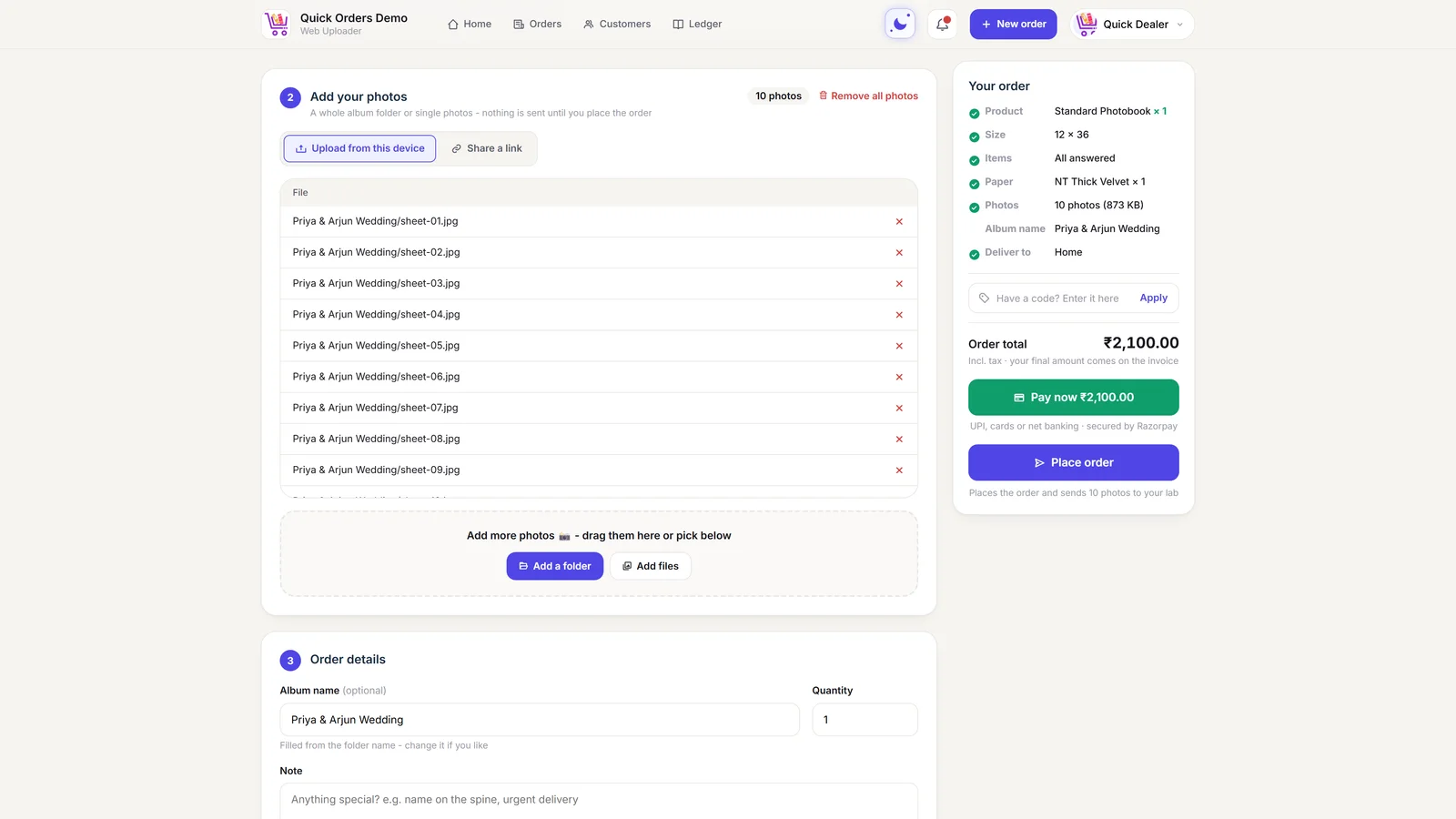
Uploads are split into small parts and continue after a break in the internet, and a failed file can be retried without starting over. The studio picks delivery to its own address, to its customer's address, or collection from the lab. Once the order is placed, the studio sees each step: placed, files uploaded, received by the lab, and the production stages the lab chooses to show.
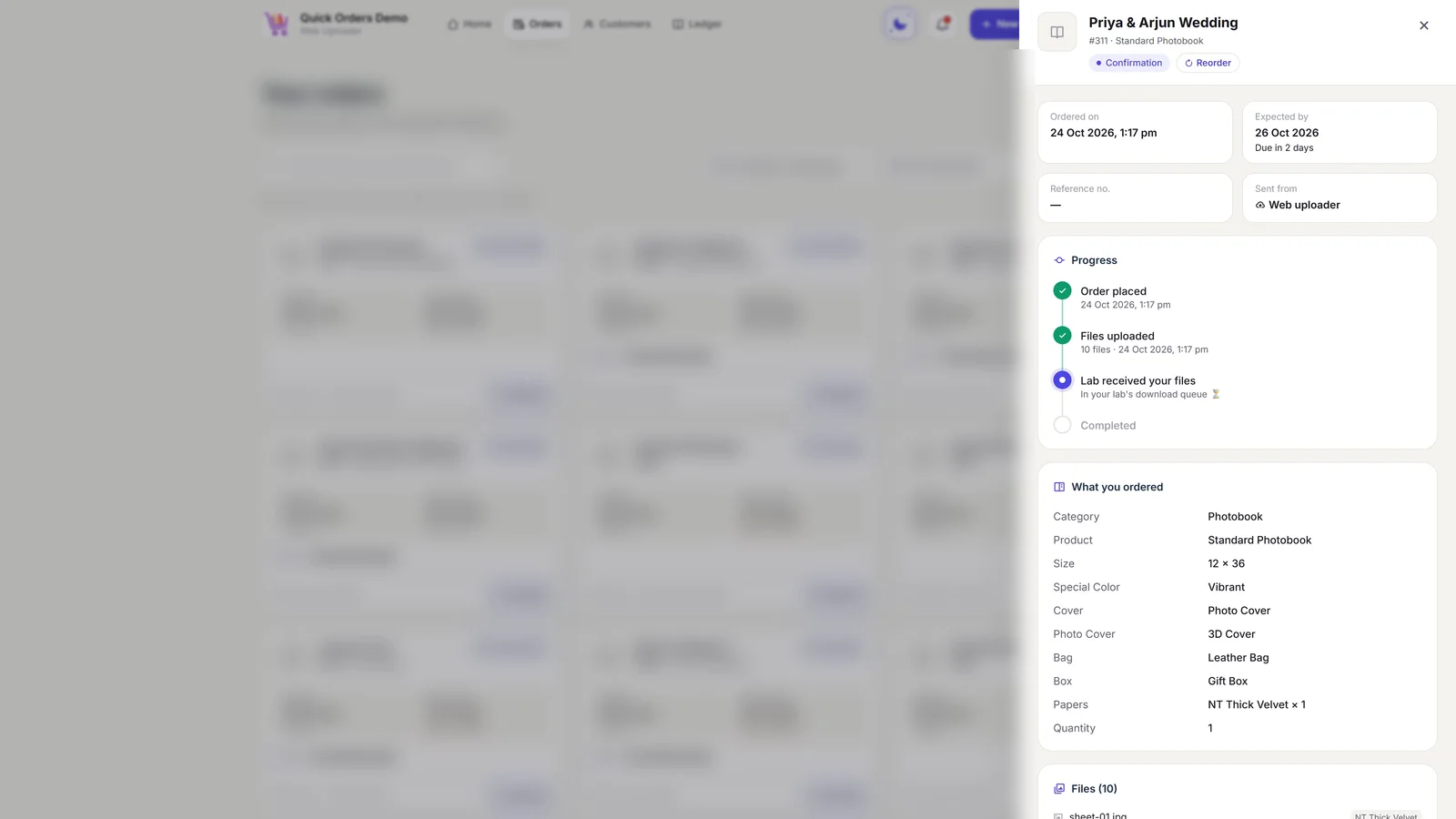
The studio also sees its bills and ledger with the lab, so month-end questions about dues have a written answer. Dealers who collect orders from smaller studios can place orders for their own customers in the same way. This short Hindi tutorial walks through the Uploader's order status, ledger and other screens:
For the lab, every studio order arrives complete. Photos download into the lab's folders by themselves, the order moves through the lab's own stages, and the studio gets WhatsApp and email updates as it moves. The lab saves typing and phone time, and the lab and the studio see the same status, which the studio can pass on to the couple. The lab team can also work from the QuickOrders mobile app.
Which tools should a studio use for selection and delivery?
The album order is one part of the studio's work. For the step before it, a gallery where the couple selects photos saves a lot of back-and-forth. PixSpace lets the couple pick photos with a deadline, hearts and comments, and lets wedding guests find their own photos with one selfie. For the step after the album, a digital album the family can open on a phone is an easy extra to offer.
When you compare the best photo studio software for your needs, judge it on the handovers, where work passes from one person to the next:
- Can the couple's selection reach the designer as a clean folder?
- Can the album order reach the lab with the photos attached?
- Can the studio see the album's status and its dues with the lab, from a phone?
- Does it run in the browser, or only as photo studio software for PC on one machine?
Our page for photographers shows how these Codnix tools fit together.
A one-week plan for the wedding season
You do not need to change everything at once. In 7 days you can:
- Ask your lab whether it has an uploader, and sign up.
- Send your next 3 album orders through it, start to finish, and note what was unclear.
- Fix your folder naming on the studio PC using the checklist above.
- Stop sending album photos on WhatsApp chat. Use the uploader, or send files as documents until you have one.
- Tell your couples the album timeline in writing, and check status yourself before they ask.
Are you a lab that wants studios to order this way? Book a demo of QuickOrders.
Frequently asked questions
What is photo studio management software?
It is software that helps a photo studio run its business: client details, bookings, photo selection, album and print orders, payments and dues. Most studios use more than one tool, and the album order part often sits with their lab's system.
What software do photo labs use to manage album orders from studios?
Labs use order management software with a studio portal. Studios sign up, place album orders with the photos attached, pay and track status, while the lab runs production, billing and dispatch from the same orders.
Is there photo studio software for PC?
Yes. Some studio tools install on a Windows PC and others run in the browser. Browser-based tools work on the studio PC, a laptop and a phone, which helps when the owner is out on a shoot.
How should a studio send album photos to a lab?
Upload the original files with the order through the lab's portal or uploader. WhatsApp photos are compressed, and Drive links often need access or get shared late, which delays the album.