
Wedding photo sharing app with QR code: a photographer's guide
How a wedding photo sharing app with QR code works for Indian photographers: setting up the event, placing the standee, and what guests see on their phones.

Short answer
- A wedding photo sharing app with a QR code lets guests scan a code at the venue or open a WhatsApp link and see the event photos in their phone browser, with no app to install.
- The best way to share wedding photos with guests is one QR code per event plus face search: each guest takes a selfie and sees only the photos they are in.
- Print the QR code at least 2 x 2 cm, test it on a few phones under venue lighting, and put it where guests stand and wait, like the entrance and the dinner counter.
A wedding photo sharing app with QR code gives every guest one simple way in: scan the code at the venue, or tap the link on WhatsApp, and the gallery opens in the phone browser. For Indian wedding photographers the useful version adds face search, so a guest takes one selfie and sees only the photos they are in, with no app and no account.
Face search is what makes the QR code useful. A shaadi can run to several thousand photos across haldi, mehendi, sangeet, the pheras and the reception. Nobody wants to scroll through all of it to find the 3 photos with their mother.
Why are photographers moving to QR code photo sharing?
Think about the week after a big wedding. The couple's families, the bride's friends, the groom's office colleagues and the cousins from abroad all want photos. Most of them message you directly, or message the couple, who then message you.
The usual answers each have a problem:
- A pen drive or hard disk goes to one person. Everyone else waits for that person to forward photos.
- WhatsApp groups squeeze each photo down. The family ends up sharing blurry copies of your best frames, with no studio name on them.
- A shared Drive folder is one long list of file names. Guests give up after a few minutes, and the link gets forwarded far beyond the wedding.
A QR code fixes the access problem: one code, printed once, opens the same gallery for everyone. Face search fixes the finding problem. Put the two together and most of those "bhaiya, meri photo bhejo" messages stop.
How does a wedding photo sharing app with QR code work?
Here is the flow with PixSpace, a Codnix product built for wedding and event photographers in India. Other tools differ in detail, but these are the steps to look for.
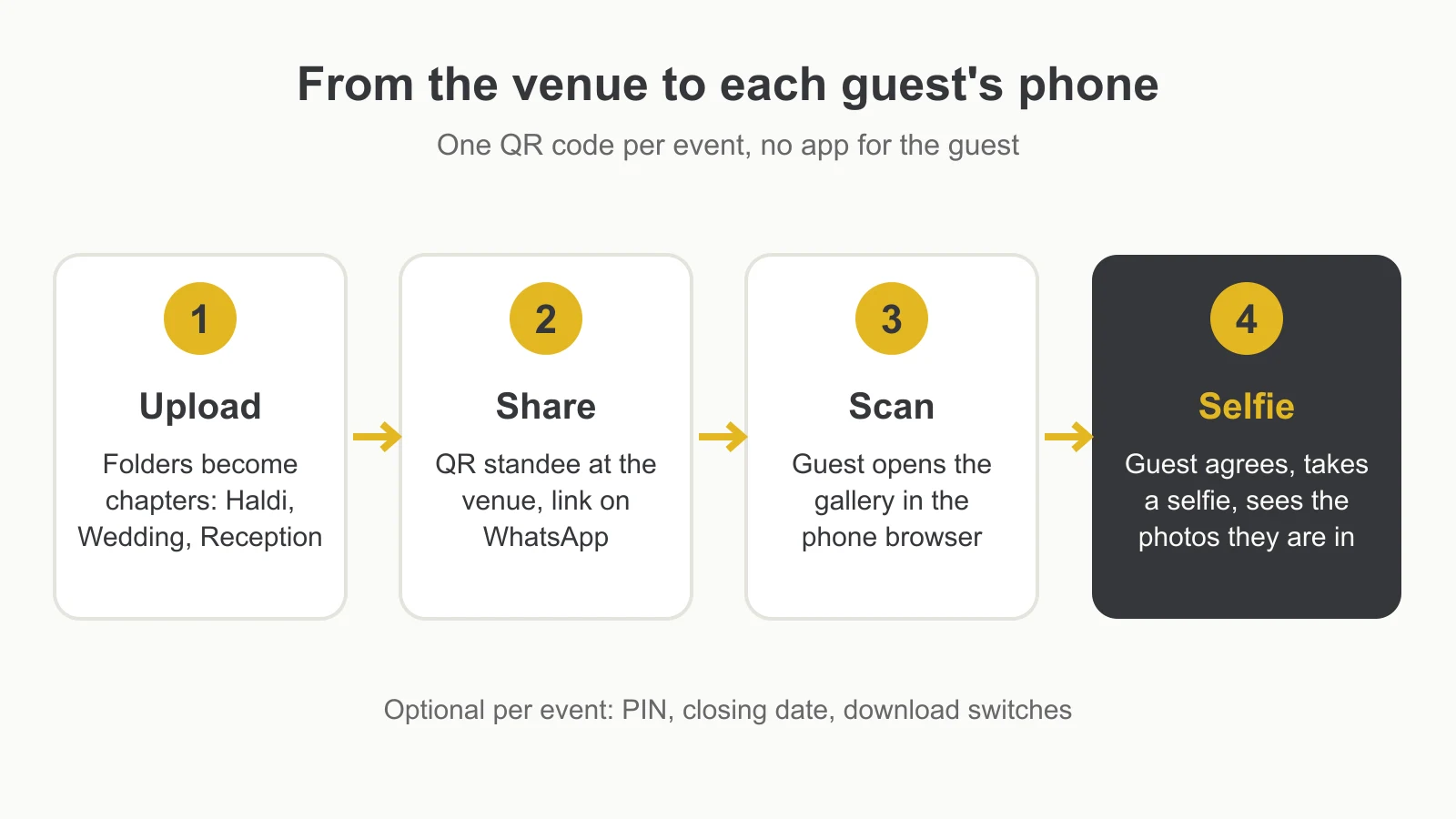
- Create the event. Give it a name and date. Choose whether to use your studio watermark, face search, a PIN, and whether guests can browse all photos.
- Upload from your laptop. Pick whole folders. Each top-level folder becomes a chapter in the guest album, so "Haldi", "Wedding" and "Reception" show up as separate sections with friendly names. Duplicates are skipped, and you choose whether to keep originals or save space with web, medium or large sizes.
- Share. Each event gets two links, each with its own QR code: "Find my photos", where guests see only the photos they are in, and the whole album for browsing. You can send either on WhatsApp in one tap, or print a ready standee.
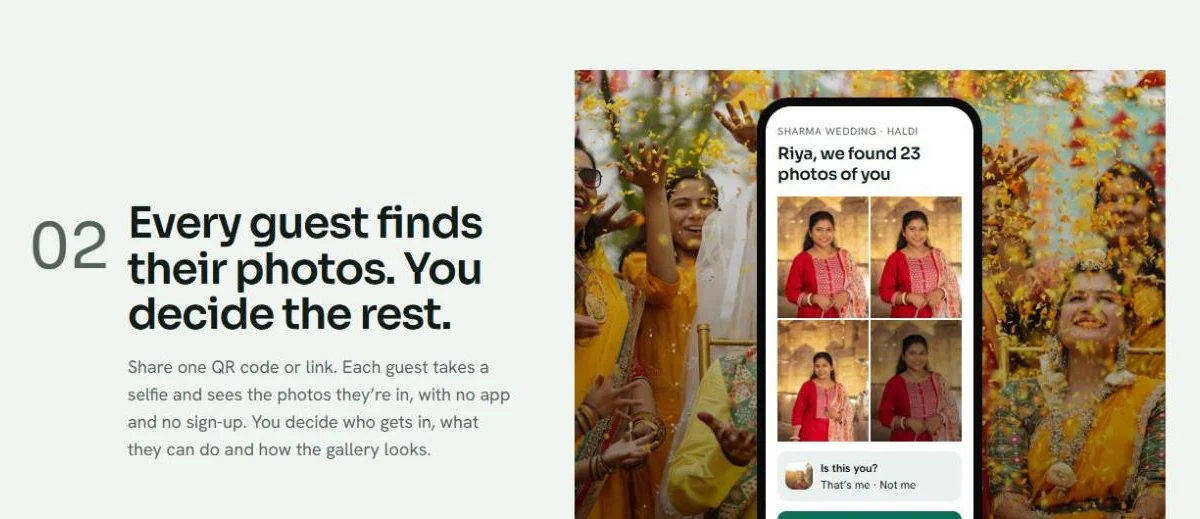
- Guests scan and search. A guest scans, types a name and phone number, ticks to agree to a face search, and takes a selfie. Sure matches show as "You're in" photos. Uncertain ones appear apart, under "Maybe you", with "That's me" and "Not me" buttons.
Your selfie question will come up with guests, so have the answer ready: in PixSpace, a guest's selfie is only used to find their photos in this event and is never shown to the photographer. We cover consent in more detail in our post on face recognition photo sharing.
Where should the QR code go at an Indian wedding?
Put the code where guests stand still with a phone already in hand. At most Indian weddings that means:
- The entrance or welcome board, next to the couple's names.
- The dinner counter, where the queue is slow.
- Near the stage, where families wait for their turn to go up with the couple.
- Each round table at the reception, as a small table card.
- The family WhatsApp group, for everyone who skipped the standee.
PixSpace makes a printable standee for each event: an A4 poster or an A5 table card with your cover photo, the QR code, "Photos by" your studio name and the link. If you set a PIN, the standee tells guests to ask for it. The PIN itself is never printed.
A few printing habits save trouble on the day:
- Size. Bitly's guide to wedding QR codes says to make the code at least 2 x 2 cm. That is the floor. On a standee people read from two or three steps away, bigger is better, which is why an A5 card or A4 poster works well.
- Test under venue light. Bitly also suggests scanning with several phones in the lighting you expect. Reception halls are dim and sangeet stages are full of coloured light. Scan your printed standee in a dark room with an older Android phone before the day.
- Plain background. Keep the area around the code clear. Don't print it on top of a busy floral design.
- One line of instruction. Adobe's wedding QR guide recommends a clear prompt such as "Scan to view wedding photos". In India, add the Hindi version too: "QR scan karein, selfie lein, apni photos dekhein."
What should guests see when they scan?
Guests should see your studio's name before they see anything else.
Check for these when you compare apps:
- Your studio name on every gallery, with links to your Instagram, Facebook, YouTube, website and WhatsApp. Every guest who scans is a possible future client.
- A design you can choose. PixSpace has 5 gallery layouts and 6 colour themes, with a live preview and a one-line welcome note.
- Chapters, not one long scroll. Haldi photos stay with haldi, and the reception stays with the reception.
- A watermark if you want one. Your logo or text can go on what guests see, while you always keep clean originals for yourself.
- Saving and sharing that you control. Guests can save a photo, add it to favourites, or send it on WhatsApp, as far as your switches allow.
Which features matter when you choose a QR photo sharing app?
People search for the best wedding photo sharing app with QR code as if one app fits everyone. It depends on what you shoot. A studio that does ten big weddings a season needs different things from a hobbyist sharing one party.
| What to check | Why it matters for a wedding photographer |
|---|---|
| Face search with selfie | Guests find their own photos in a gallery of thousands |
| No app, no sign-up for guests | Older relatives open it from WhatsApp without help |
| Folder upload and duplicate skip | A full wedding goes up in one go from the laptop |
| Chapters by function | Haldi, mehendi, sangeet and reception stay separate |
| QR code, standee, WhatsApp link | Every guest has a way in, at the venue or later |
| PIN, closing date, download switches | You decide who sees what, and for how long |
| Studio name and social links | Each gallery points back to your business |
| Honest matching | Unsure matches shown apart, so guests don't see strangers' photos as theirs |
Many apps built for couples collect pictures from the guests' own phones into a shared album. As the photographer, you need a delivery tool for your work, with your name on it.
How do you control access after the wedding?
The QR code keeps working as long as the event is live, so plan the end too.
- PIN. A 4-digit PIN keeps the gallery to people who were told it.
- Replace the link. If a link gets forwarded too widely, make a new one. The old link and every printed QR code stop working at once, so only do this when you mean it.
- Closing date. Set a date up to 2 years ahead. After it, guests see that the gallery has closed. Nothing is deleted, and you can change or remove the date at any time. You get an email 3 days before.
- Download switches. Turn off saving, full size or WhatsApp sharing per event.
If the couple also wants to pick their album photos, keep that separate from the guest gallery. PixSpace has a private photo selection link with a PIN and a deadline for that job. Our guide to an online photo gallery for photographers covers selection and delivery in more detail.
A checklist for your next wedding
Run through this a day before the event:
- Create the event with the right name and date, and switch on face search.
- Decide on a PIN and on download switches.
- Print the standee (A4 at the entrance, A5 cards on tables) and scan it in a dim room.
- Send the WhatsApp link to the couple to forward to the family group.
- Upload by function, one folder per chapter, as soon as you can after each day.
- Set a closing date, and note it in your package terms so the couple knows.
PixSpace does the QR codes, standee and WhatsApp links described here, with selfie search for guests and your studio's name on every gallery. See the PixSpace product page, or browse all our tools for photographers and studios. If you also hand over an album, eAlbum puts the finished album on the family's phones.
Start free with PixSpace: 5 GB, up to 5,000 photos, at pixspace.in.
Frequently asked questions
How do guests find their photos at a wedding?
The photographer uploads the event and shares one QR code or WhatsApp link. A guest scans it, agrees to a face search, takes a selfie, and sees the photos they appear in, with no app or account.
Do guests need to download an app to scan a wedding QR code?
No. The phone camera reads the QR code and the gallery opens in the browser. Guests type their name and phone number, and a PIN if the photographer set one.
Where should I place the QR code at a wedding?
Put a standee at the entrance, on the dinner counter and near the stage queue, where guests wait with a phone in hand. Send the same link on the family WhatsApp group for guests who missed it.
What size should a wedding QR code be?
Bitly's guide says at least 2 x 2 cm. For a standee seen from a few steps away, an A5 table card or an A4 poster gives a much larger code that scans easily in dim light.
Can I stop guests from downloading wedding photos?
In PixSpace, each event has switches for saving photos, full size and WhatsApp sharing, plus an optional PIN and a closing date, so you decide how much guests can take.