
Wedding album size in pixels: Indian sizes at 300 DPI
Wedding album size in pixels for 12x24, 12x30, 12x36 and 14x40 albums at 300 DPI, with page sizes, bleed, gutter and a check before you print.
Short answer
- Pixels are inches times DPI. At 300 DPI a 12x36 album spread is 10800 x 3600 pixels, and each 18x12 page in it is 5400 x 3600 pixels.
- Indian album sizes usually name the open spread: a 12x36 album has 12x18 pages, a 12x30 has 12x15 pages and a 14x40 has 14x20 pages.
- Add the lab's bleed only on the outer edges of the spread, keep text and faces well inside the trim, and keep faces out of the centre fold.
- Check every spread for size, resolution and page count before the files go to print, because a mistake found after printing costs a full reprint.
A wedding album size in pixels is the album size in inches multiplied by the DPI. At 300 DPI, a 12x36 spread is 10800 x 3600 pixels and each 18x12 page is 5400 x 3600 pixels. A 14x40 spread is 12000 x 4200 pixels. Add bleed only on the outer edges, and design every spread at the same size.
Below are the sizes, the pixel table, and the bleed and fold rules, for album designers and lab operators who need the first print to come out right in wedding season.
What does "12x36" mean in an Indian album size?
Search for wedding album sizes in India and the same numbers keep coming back: 12x36, 12x18, 12x30, 14x40. They do not all describe the same thing.
Most Indian labs name an album by its open spread. A 12x36 album is 12 inches tall and 36 inches wide when it lies open. Fold it in the middle and each page is 18 inches wide and 12 inches tall. So a "12x36 album" and an album with "12x18 pages" are often the same book.
Some price lists use the page size instead. A "12x18 album" in one lab's list can mean 12x18 pages (a 12x36 spread). In another it can mean a 12x18 open spread with two 9x12 pages. Before you set up a design file, ask which one the lab means.
| Album (open spread) | Page size | Typical use |
|---|---|---|
| 12x24 | 12x12 square | Pre-wedding, engagement, smaller budget albums |
| 12x30 | 15x12 | A wider page without the weight of 12x36 |
| 12x36 | 18x12 | The usual wedding album format |
| 14x40 | 20x14 | Large premium wedding albums |
Wedding album size in pixels at 300 DPI
To get pixels, multiply inches by the resolution. At 300 DPI, 12 inches becomes 3600 pixels and 36 inches becomes 10800 pixels. That is simple arithmetic, and the same rule gives every row below.
| Album | Spread in pixels (W x H) | One page in pixels | At 250 DPI (spread) |
|---|---|---|---|
| 12x24 | 7200 x 3600 | 3600 x 3600 | 6000 x 3000 |
| 12x30 | 9000 x 3600 | 4500 x 3600 | 7500 x 3000 |
| 12x36 | 10800 x 3600 | 5400 x 3600 | 9000 x 3000 |
| 14x40 | 12000 x 4200 | 6000 x 4200 | 10000 x 3500 |
Nations Photo Lab, a US photo lab, lists a 12x36 print at 3600 x 10800 pixels in its 300 PPI column, which matches the table. Its guide also says images of "125 PPI or higher print beautifully". That figure is for the photos you place inside the design. The design file itself should be set up at 300 DPI at the final size, so text, borders and backgrounds stay sharp.
These are big files. A 12x36 spread at 300 DPI is close to 39 million pixels. Uncompressed in 8-bit RGB that is about 117 MB per spread (10800 x 3600 x 3 bytes). Saved as a high-quality JPEG it is much smaller, but a 30 to 40 spread album still runs into gigabytes. Plan your storage and the way designers send files to you.
How much bleed, safe margin and gutter does an album need?
Size and pixels are only half the setup. Albums are trimmed after printing and folded or bound in the middle, so three zones matter on every spread.
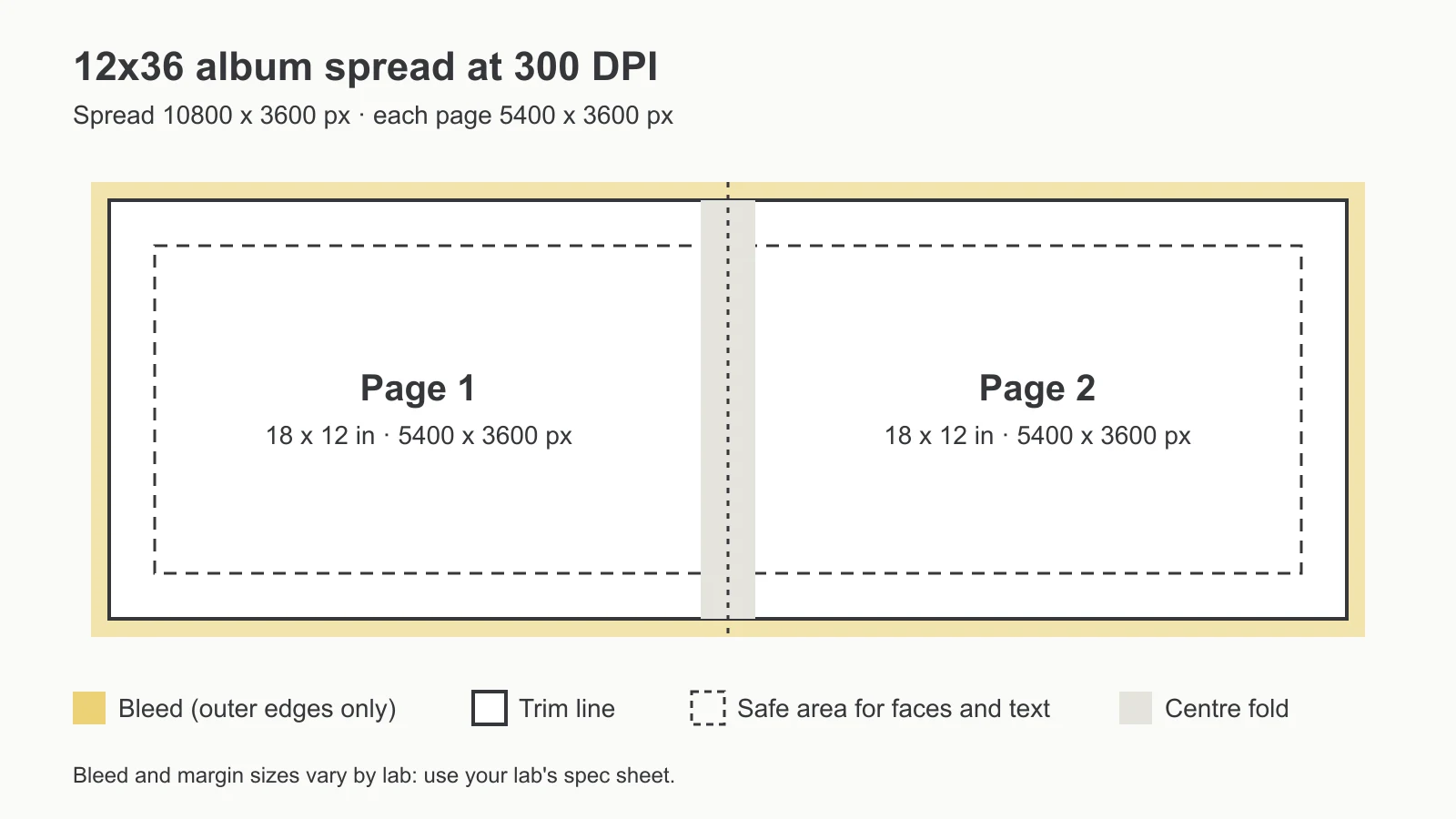
Bleed is extra picture past the trim line, so a cut that drifts slightly still shows picture at the edge. Labs set this differently. RedTree Albums says it trims "an estimated 1/4" off of all books", so a full-bleed photo must run to the very edge of the file. Prodigi asks you not to add bleed at all because its system adds it. If your lab asks for 0.125 inch on each outer edge, a 12x36 spread becomes 36.25 x 12.25 inches, or 10875 x 3675 pixels at 300 DPI. The bleed goes on the outside edges only, never down the middle.
The safe margin keeps names, dates and faces away from the cut. RedTree recommends a border of 3/4 inch to 1 inch for photos that do not run to the edge. Prodigi asks for a 10mm safety margin on every page. Pick your lab's number and draw it as a guide in your template.
The gutter is the fold in the centre of the spread. Layflat albums open flat and a panorama can cross the middle. Even then, keep faces and text away from the crease. In books that do not lie flat, Prodigi says the binding hides about 6mm, and RedTree says 3/4 inch of each page falls into the gutter on its magazine-style books. A face caught in the fold cannot be fixed once the album is bound.
Should you send spreads or split pages?
Designers usually work in spreads because that is how the couple sees the album. Printing systems differ. Some labs print the spread as one sheet, some print each page and bind them, and some online systems want "single pages, not spreads", in Prodigi's words.
If your lab takes spreads and splits them itself, three things help:
- Every spread is the same size. One 12x30 file in a 12x36 album breaks the order.
- Files are named in page order: 01, 02, 03, so 10 does not sort before 2.
- The page count matches the order. An album with 30 spreads has 30 files, plus the cover in its own folder.
Splitting by hand is slow: open each spread, cut it at the centre, save two pages, check the size, and repeat for every spread in the album. One wrong cut or a skipped file is easy to miss.
Check the files before they go to print
A wrong size or a low-resolution photo is usually found only when the printed sheet comes out. In wedding season that means a reprint, a late album and an unhappy studio. A short check on every order catches most of it:
- Spread size matches the album size on the order, including bleed if the lab wants it.
- Resolution is 300 DPI at print size, and no placed photo is below about 125 PPI.
- Faces and text sit inside the safe margin and away from the centre fold.
- Page count matches the order, and no file is damaged or will not open.
- The cover, box and bag files are in their own sizes, not the page size.
- Colour mode is what the lab asks for. RedTree and Prodigi both ask for RGB files.
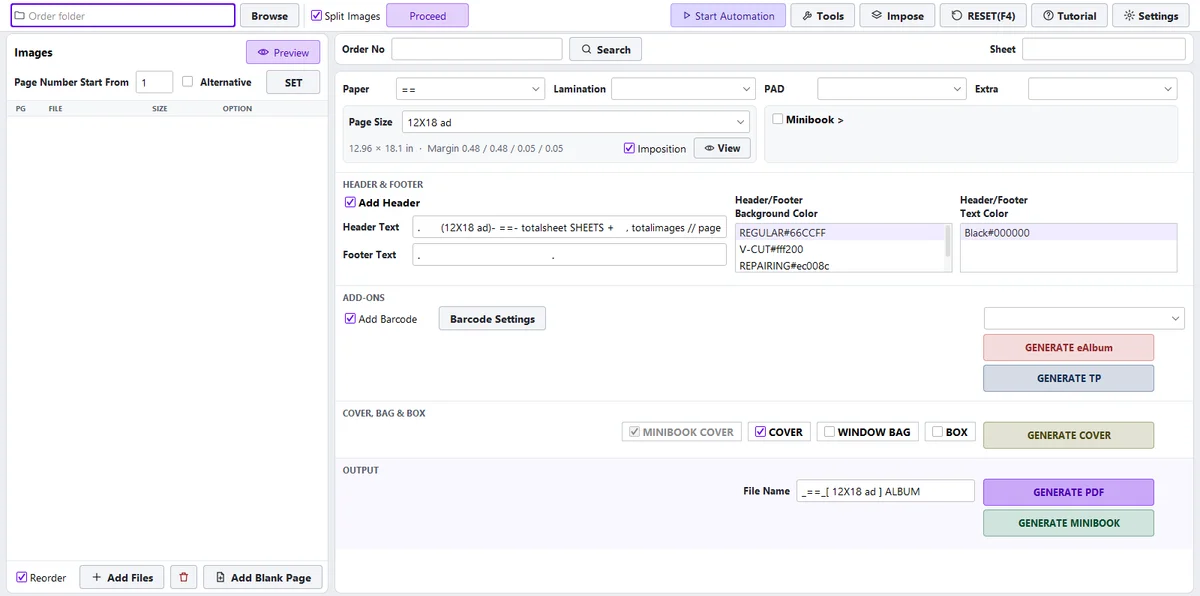
Labs that print albums every day often move this check into software. Quick PDF Generator is Windows software for album labs that does it before any PDF is made. You pick the order folder, it splits every spread into pages, and it checks page size, DPI, damaged images and page count. Then it makes the photobook, minibook, cover, box and bag PDFs with cut marks. Sizes are set up once with a built-in size calculator that also converts mm to inches. This short Hindi tutorial shows how to add a new album size:
A quick setup checklist for album designers
If you design albums and send them to a lab, set these up before the next wedding comes in:
- Ask the lab for its size list, and whether each size is the spread or the page.
- Make one template per size at 300 DPI, using the pixel table above.
- Add the lab's bleed on the outer edges and draw the safe margin and centre line as guides.
- Keep faces off the fold and text inside the safe margin on every spread.
- Export the colour mode and file type the lab asks for, and name files in page order.
- Keep the cover, box and bag designs in separate folders, each in its own size.
For the lab side of the job, from the studio's upload to the printed album, see our software for photo labs. Orders can arrive with their details through QuickOrders, and every album can carry a QR code that opens its digital copy on eAlbum.
Want to see your own album sizes set up and checked? Book a demo of Quick PDF Generator.
Frequently asked questions
What is the size of a 12x36 album in pixels?
At 300 DPI a 12x36 spread is 10800 x 3600 pixels. Each page of it is 18 x 12 inches, which is 5400 x 3600 pixels. Add the lab's bleed on top if it asks for it.
What is the standard wedding album size in India?
There is no single standard. The sizes that come up most are 12x36 spreads (12x18 pages), 12x30, 12x24 and the bigger 14x40. Ask your lab which sizes it binds and whether its list gives the spread or the page.
What DPI should a wedding album design be?
Design at 300 DPI at the final print size. Photos inside the design can be lower: Nations Photo Lab says images of 125 PPI or higher print well, so use that as a floor, not a target.
Should I send spreads or single pages to the lab?
Follow the lab. Many Indian labs take full spreads and split them for printing; some systems ask for single pages. If you send spreads, keep them all the same size and name them in page order.
How much bleed does a wedding album need?
Labs differ. RedTree Albums says it trims about a quarter inch off every book, while Prodigi adds bleed itself. Use the bleed in your lab's spec sheet and put it only on the outside edges of the spread.