
Mini book album: sizes, page ratio and cut and stack printing
What a mini book album is, which minibook sizes keep the main album's page ratio, and how labs print minibooks with cut and stack imposition.
Short answer
- A mini book album is a small copy of the main wedding album, made from the same designs, often given to parents and close family.
- The best minibook size keeps the shape of the main album page. A 12x36 album has 18x12 pages, so 9x6 or 6x4 inch minibook pages use the same designs without cropping.
- Shrinking a page to half its size also halves its text. A 12 point name on the main album prints at 6 points in a half-size minibook, so check small text.
- Labs often print minibooks several pages to a sheet with cut and stack imposition, so each cut pile comes out in page order without sorting.
A mini book album is a small copy of the main wedding album, printed from the same designs and often given to parents and close family. There is no single minibook size. The best one keeps the shape of the main album page, so a 12x36 album with 18x12 pages gets a minibook with 9x6 or 6x4 inch pages, and nothing has to be cropped.
This guide is for labs and studios that sell minibooks with their albums. It covers what to offer, how to pick the size, what to check in the files, and how labs print minibooks on the press sheet.
What is a mini book album?
The main album goes home with the couple. The minibook goes to the parents, the in-laws, or a grandparent who wants their own copy. Photojaanic, an Indian photo book company, describes its mini photo book as "a compact companion to the main wedding album", and suggests it as a gift for parents or bridesmaids.
Printique, a US photo lab, sees the same use. It suggests mini books for parents, grandparents, the wedding party and guests who travelled, each with a slightly different set of photos.
In Indian labs, the minibook is usually made from the same spreads as the main album, at a smaller size. The studio does not design it again, so one design becomes two products. It also means the size has to be right, or the same designs will not fit.
What size should a mini book album be?
Start from the main album page, not from a list of popular sizes. If the minibook page has the same ratio as the main page, every design shrinks evenly and nothing is cut off.
| Main album (sheet) | Main page | Ratio | Minibook pages that keep the ratio |
|---|---|---|---|
| 12x36 | 18 wide x 12 high | 3:2 | 9x6 (half size), 6x4 (one third) |
| 12x30 | 15 wide x 12 high | 5:4 | 7.5x6 (half size), 10x8 |
| 12x24 | 12x12 square | 1:1 | 6x6 (half size), 4x4 |
These are simple arithmetic: divide both sides of the page by the same number. A 9x6 minibook page opens into an 18x6 spread, which is the 12x36 spread at half size.
Sizes from abroad look different. Printique's wedding mini book is 4x4, with 5x7 and 7x5 as other options. Photojaanic's mini photo book has 3.94 x 5.25 inch pages with wiro binding. Those work for a new design made for that size. For a copy of a 12x36 album, a 4x4 page would cut a third off every spread.
What happens when the ratio is wrong?
Say the main album is 12x36 and the minibook is 6x8. The main page is 3:2 and wide; the minibook page is 3:4 and tall. To fit, you either crop each page to a tall shape and lose the sides, or fit the whole page and leave large white bands above and below.
Neither looks good on a family copy of a wedding album. Faces near the edge of a spread get cut, and text placed near the edge disappears. If a studio asks for a size that does not match, show them one cropped page before you print the whole book.
What to check before you print a minibook
A minibook is the main album at a smaller size, so most of the checks are about what gets too small.
- Small text. Halving the page halves the text. A couple's name set at 12 points on the main album prints at 6 points in a 9x6 minibook, and a date at 8 points becomes 4. Look at the smallest text on the smallest page at 100% zoom.
- Resolution is rarely a problem. The main album's files have far more pixels than a small page needs. Nations Photo Lab lists 1800 x 2700 pixels for a 6x9 print at 300 PPI, while one 18x12 page of a 12x36 album at 300 DPI is 5400 x 3600 pixels.
- File size can be a problem. Building a minibook PDF from full-size spreads makes a heavy file. Many labs shrink the images to the minibook size first.
- Fold and margins. Keep the same rules as the main album: faces off the fold, names inside the safe area. The margin in inches is smaller, so check it again.
- Page count. The minibook usually has the same pages as the main album. If it is a shorter selection, check it against the studio's list.
Our guide to wedding album size in pixels has the pixel sizes of the main album pages.
How are minibooks printed? Cut and stack explained
A 9x6 page is small, so labs print several on one sheet and cut them apart. Cut and stack is the imposition that keeps this simple. Fiery's documentation for its print software describes it as a layout where the sheets can be stacked, cut and restacked into piles that stay in order "without any additional sorting".
Here is a worked example. Four 9x6 pages fit in an 18 x 12 inch block, which fits on a 13x19 sheet with about half an inch spare on each side. That is tight, so check your press's printable area and gripper margin first. Printed on both sides, each sheet carries 8 pages. A 40 page minibook needs 5 sheets.
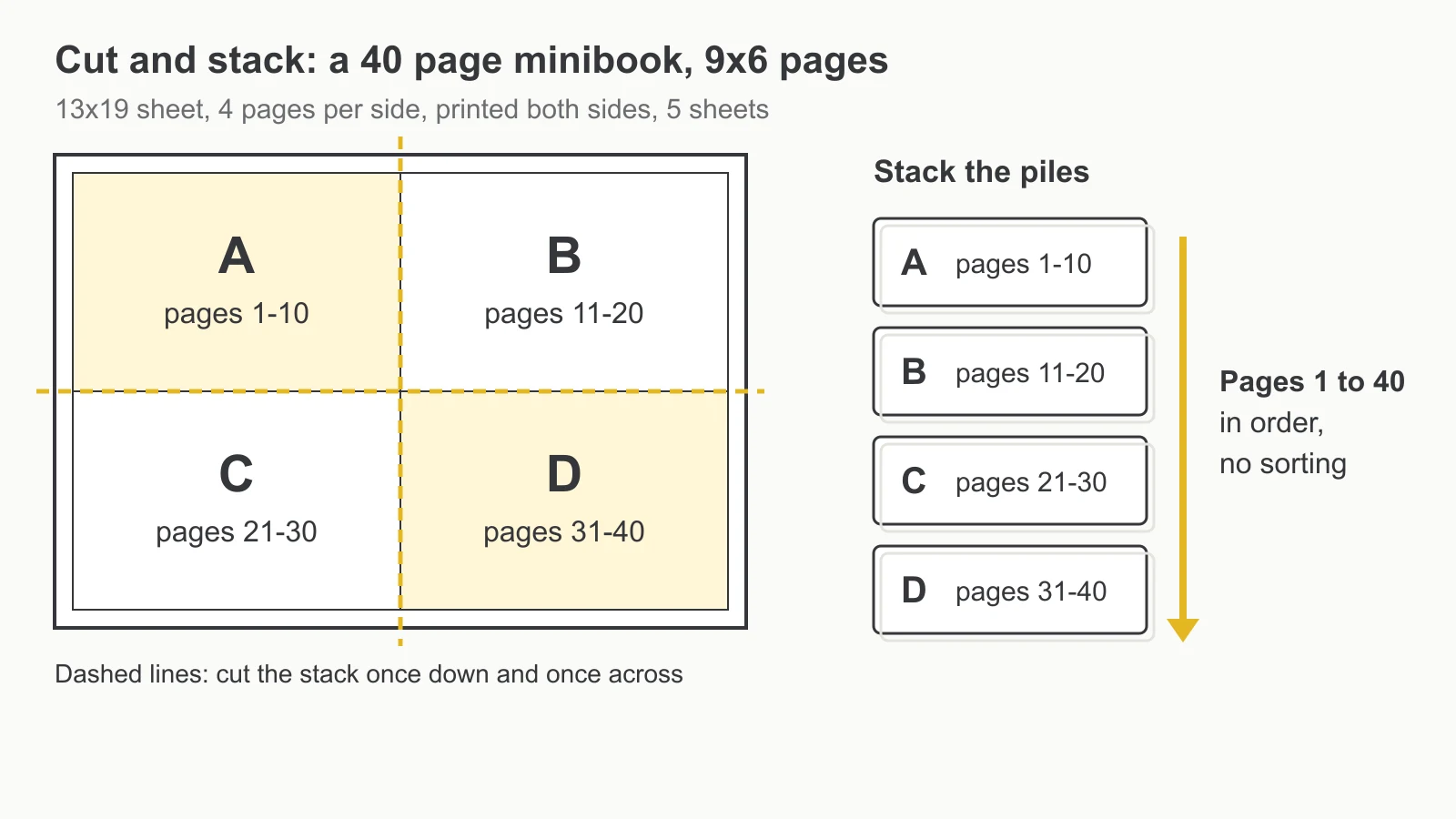
With cut and stack, each position on the sheet carries a run of pages through the whole stack:
- Position A: pages 1 to 10 (sheet 1 front and back holds pages 1 and 2, sheet 2 holds 3 and 4, and so on).
- Position B: pages 11 to 20.
- Position C: pages 21 to 30.
- Position D: pages 31 to 40.
Print the 5 sheets, keep them in order, and cut the stack once across and once down. You get four piles. Put pile A on top of B, B on C, and C on D, and the minibook is in page order. Nobody has to sort 40 small pages by hand, and no page goes into the wrong book.
The arithmetic changes with the page count. If the count does not divide evenly, the last pages of the run are blank, which is one reason to keep minibook page counts in steps that suit your sheet.
The minibook cover and the rest of the order
A minibook needs its own cover, at its own size, smaller than the main album cover. Some studios order a small box or bag for it too. Keep each of these in its own size list and its own folder, so the operator never prints a minibook cover at the album cover size.
If you print Karizma albums, our Karizma album size guide shows the three common sheets and what they fold into, which is where the minibook size starts.
Making the minibook with the main album
The minibook is easiest when it is made in the same step as the main album, from the same pages, with its size already linked to the album size.
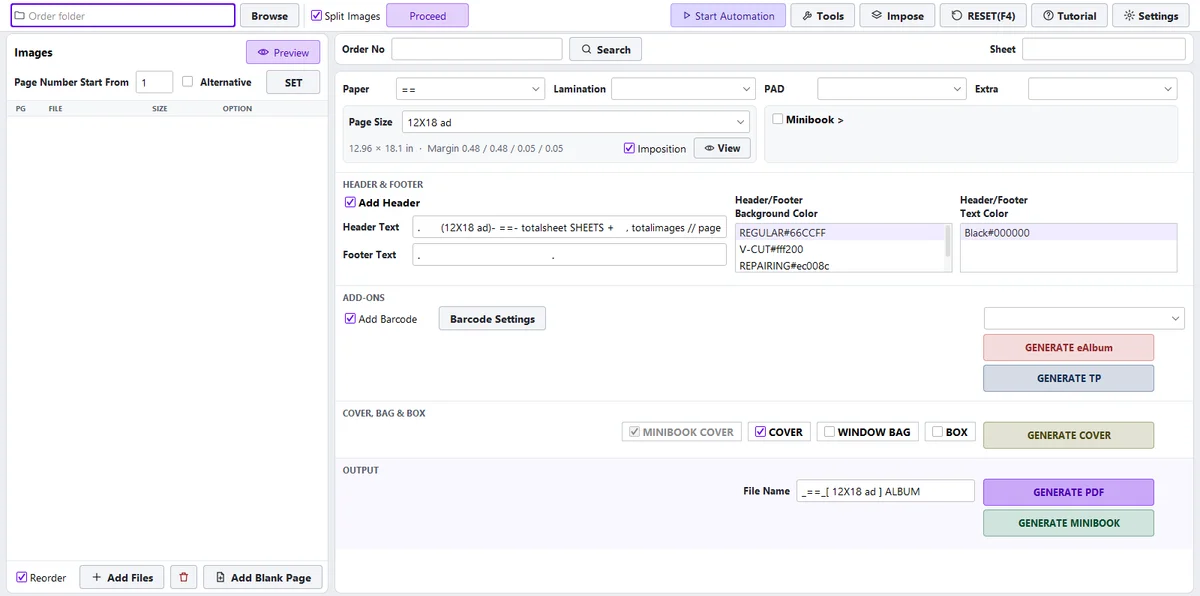
Quick PDF Generator is Windows software for album labs that works this way. Each album size can have a linked minibook size with its own margins. After the main photobook PDF, the operator ticks Minibook and clicks GENERATE MINIBOOK to make the minibook from the same pages.
Imposition templates, including cut and stack, are saved per size, and a Shrink option makes smaller copies of the images so the minibook PDF is lighter. The minibook cover is a separate PDF in its own size, and Merge joins the photobook and minibook PDFs when a press wants one file. It saves staff time and cuts mistakes, because the minibook size and layout come from the setup. This short Hindi tutorial shows how to set up and make a minibook with cut and stack:
For the full steps from designed spreads to print files, see how to make an album PDF for printing, and for orders and production across the lab, our software for photo labs.
Selling minibooks with your albums? Try Quick PDF Generator free for 15 days, or call or WhatsApp +91 79904 72581 for a demo.
Frequently asked questions
What is a mini book album?
It is a smaller copy of the main wedding album, printed from the same spreads at a reduced size. Couples order them for parents, in-laws or close relatives, and labs usually make them with the main album.
What size is a mini book album?
There is no single size. For a 12x36 album with 18x12 pages, 9x6 or 6x4 inch pages keep the same shape. Abroad, small photo books often come in 4x4 or 5x7 inches.
Can a minibook use the same design files as the main album?
Yes, if the minibook page has the same ratio as the main page. Then each design only gets smaller. If the ratio differs, every page has to be cropped or gets white bands.
What is cut and stack in minibook printing?
It is a way of placing pages on a print sheet so that after the sheets are cut, each pile holds a run of pages in order. You put the piles on top of each other and the book is in order.
Does a minibook need its own cover?
Yes. The minibook cover has its own size, smaller than the main album cover, and it should be set up and printed as a separate file.