
Face recognition photo sharing: how it works and is it private?
Face recognition photo sharing explained for photographers: how a selfie finds a guest's photos, what consent looks like, and what to ask about privacy.
Short answer
- Face recognition photo sharing lets a guest take one selfie and see only the event photos they appear in, instead of scrolling through the whole gallery.
- It is private when the guest agrees before the camera opens, the search is limited to that one event, and the photographer never sees the selfie.
- No face matching is perfect, so a good app keeps sure matches apart from uncertain ones and lets the guest say which photos are really them.
Face recognition photo sharing lets each guest at a wedding or event take one selfie and see only the photos they are in. It is private when three things hold: the guest agrees before the camera opens, the search covers only that event's photos, and the photographer never sees the selfie. Ask any app you consider how it handles each of these.
Photographers ask us about privacy more than about anything else in this feature, and fairly so. Faces are personal. Below is how the matching works in plain words, what Indian law says about consent, and what you can tell guests when they ask.
How does face recognition photo sharing work?
There are two halves. One happens when you upload, and one happens when a guest searches.
When you upload an event, the software looks for faces in each photo. For every face it finds, it stores a set of numbers that describes that face. It keeps those numbers with the event. The faces are now searchable inside that one event.
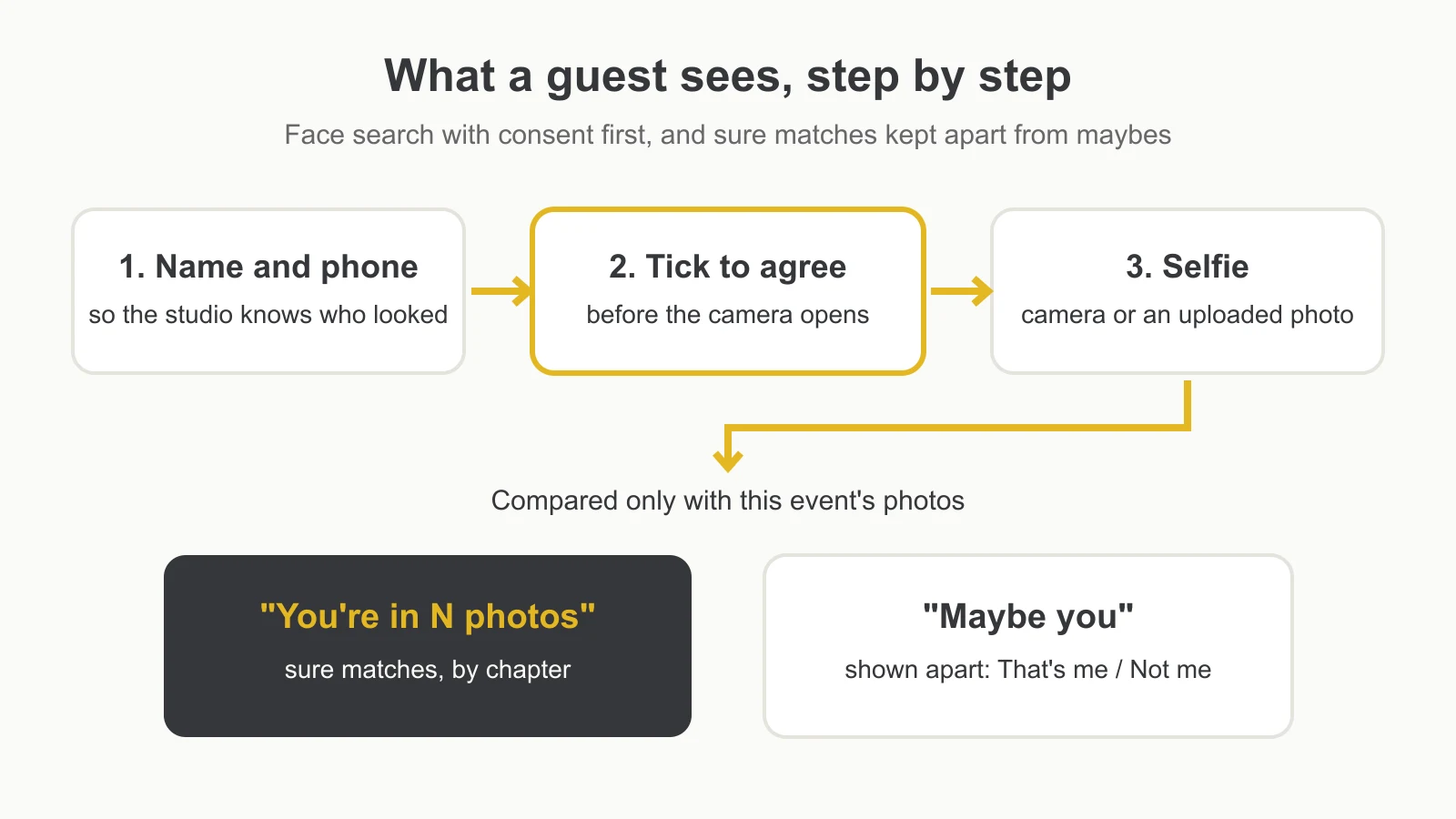
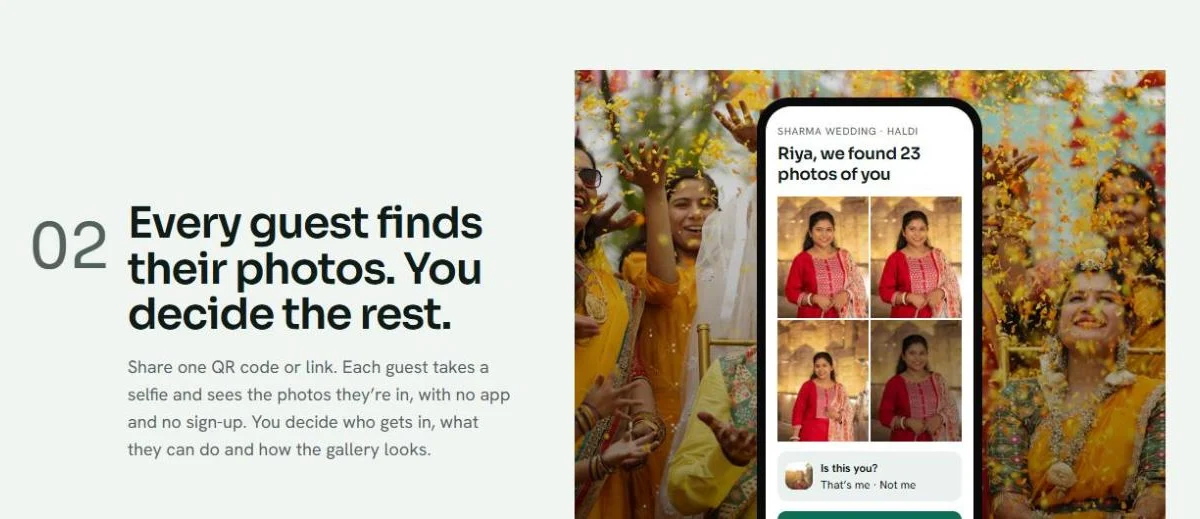
When a guest wants their photos, they open the event's link or scan its QR code, agree to a face search, and take a selfie. The software makes the same kind of description from the selfie and compares it with the faces from the event. Photos with a close match are shown to the guest. Photos with a weaker match can be shown as "maybe".
Say a guest is in 60 of a wedding's 4,000 photos. A "find my photos with selfie" search shows them those 60, sorted by chapter, and they don't have to scroll for 30 minutes.
Is face recognition photo sharing private?
It depends on how the app is built and set up, so here are the questions worth asking, with what PixSpace does for each.
| Question to ask | Why it matters | In PixSpace |
|---|---|---|
| Does the guest agree before the camera opens? | Consent should come first, not buried in terms | The guest ticks "I agree to a face search for this event" before the camera opens |
| Is the search limited to one event? | A guest at one wedding should not find themselves in another | The selfie is compared only with that event's photos |
| Can the photographer see guest selfies? | Guests trust a studio more when their selfie stays with the app | The selfie is never shown to the photographer |
| Are uncertain matches kept apart? | Mixing in wrong faces shows people photos of strangers | Unsure matches appear under "Maybe you", never mixed in |
| Is the gallery hidden from search engines? | Wedding photos should not show up on Google | Galleries are hidden from search engines |
| Can access be closed? | Links get forwarded | PIN, closing date and a new link that switches off the old one |
In PixSpace, your selfie is only used to find your photos in this event and is never shown to the photographer. That is the line we suggest you give guests who ask.
Guests also give their name and phone number when they open a gallery, so the studio knows who found their photos. You see that list in the Guests tab, with how many searches and downloads each guest made. If a guest asks you to remove them, you can remove that guest, which erases their data for the event.
Two more points worth knowing. The previews shared with guests carry no location data from the camera. And when you delete an event, its photos, face data and guest list go with it, so plan your closing date and deletion as part of the package.
What does Indian law say about consent?
India's Digital Personal Data Protection Act, 2023 sets the basic rule in section 6(1). Consent has to be "free, specific, informed, unconditional and unambiguous with a clear affirmative action", and limited to the data needed for the stated purpose.
Section 5 adds that the request for consent must come with a notice telling the person what data is being processed and for what purpose. Section 8(7) says data should be erased when consent is withdrawn or the purpose is no longer served, unless a law requires keeping it.
We make software and are not lawyers, so read the Act yourself or ask your advisor about your own case. In practice, for a wedding gallery, it points to a few habits:
- A clear tick box before the camera, which says what the face search is for. A pre-ticked box or a line hidden in the terms does not count as "a clear affirmative action".
- A purpose that stays narrow: finding this guest's photos in this event. Not building a list of faces across events.
- A way for people to say no. Guests who decline should still be able to browse the album if you allow browsing.
- A plan for the end. Decide when the gallery closes and when you delete the event, and tell the couple.
How accurate is face matching on wedding photos?
Good, but never perfect, and anyone who says "100% accurate" is selling. NIST, the US standards body that has tested face recognition algorithms for years, reports that image quality, masks and image conditions all change how well matching works. Its tests also look at false positives and false negatives separately, because both kinds of mistake happen.
At a wedding you can predict where the trouble comes from:
- A guest in the back row of a group photo of 80 people has a face only a few dozen pixels wide.
- A side profile during the pheras, a dupatta across the face, or sunglasses at a day haldi.
- Harsh stage lights at the sangeet, or deep shadow at an evening reception.
- Children, whose faces change a lot from photo to photo.
The honest way to deal with this is to show the guest what the software is sure about and what it is not. In PixSpace, sure matches appear as "You're in N photos". Uncertain ones are shown apart under "Maybe you", each with "That's me" and "Not me", and those answers are remembered for later searches. Small, distant faces never count as a sure match, so a stranger's tiny face in the background never shows up as a sure match in someone's results. Album spreads and wide panoramas are searched too.
What should you tell the couple and the guests?
Most guests will just scan and smile. A few will ask, and an elder in the family may ask loudly. Have short answers ready.
For the couple, add a line to your package or contract that you use face search to deliver photos to guests, that guests agree on their own phone before searching, and when the gallery will close, for example 90 days after the wedding. Couples who are uneasy can ask you to share only the whole album link with a PIN.
On the standee, the QR code and "Find your photos with a selfie" are enough. Keep the privacy wording short. Guests see the consent box on their phone anyway.
For a guest who asks at the venue, try this: "You tick a box before the camera opens. Your selfie is only used to find your photos in this event, and I never see it."
Where face recognition fits in your delivery
Face search solves one problem: thousands of photos and hundreds of guests who each want a few. It sits alongside the rest of your delivery. The couple still gets the full set, picks album photos, and receives the printed or digital album.
If you are setting up QR codes for the first time, our guide to a wedding photo sharing app with QR code covers standee placement and testing. For an older look at how face recognition can help photo selection, see face recognition based photo selection. And all our tools for studios are on the photographers solutions page.
PixSpace is built for this job: guests find their photos with one selfie, no app and no account, with consent before the camera and your studio's name on every gallery. Start free: 5 GB, up to 5,000 photos, at pixspace.in.
Frequently asked questions
Is face recognition photo sharing private?
It can be, if the guest agrees first, the search covers only one event's photos, and the selfie is not shown to the photographer. In PixSpace, a guest's selfie is only used to find their photos in this event and is never shown to the photographer.
How does find my photos with a selfie work?
The guest opens the event link, agrees to a face search and takes a selfie. The app compares that face with the faces found in the event's photos and shows the ones that match.
Can a guest refuse face search and still see photos?
Yes, if the photographer shares the whole album link with browsing turned on. The guest can scroll the chapters without taking a selfie.
How accurate is face recognition for event photos?
It depends on the photo. Small faces in the back of a crowd, side profiles and heavy shadows are harder to match. That is why uncertain matches should be shown separately and confirmed by the guest.
Do I need consent from guests in India?
India's Digital Personal Data Protection Act, 2023 says consent must be free, specific, informed and given by a clear affirmative action. A tick box before the camera opens, with a plain explanation, is the practical way to get it.