
Photo lab order management: album orders off WhatsApp
Photo lab order management for album labs: why orders on WhatsApp, Drive and WeTransfer go missing, what one order record needs, and how to move studios over.

Short answer
- Album orders that arrive as WhatsApp chats, Drive links and WeTransfer links split the order details from the photos, so labs lose time matching them and miss details.
- One order record should hold the studio, album size, spreads, paper, cover, box and bag, delivery date and the photos together, and every order should have one current status.
- WhatsApp HD photos are still compressed, and free WeTransfer links last up to 3 days, so neither is a safe place to keep print files.
- Move studios over with a lab code sign-up, a short video, a start date, and WhatsApp kept for status updates instead of new orders.
Photo lab order management means every album order reaches the lab as one complete record: studio, size, pages, paper, cover, delivery date and the photos together, with one status everyone can see. Many Indian album labs still take orders as WhatsApp chats with photos on Drive or WeTransfer. This guide shows where that breaks and how to move studios to one order gateway.
Why do album orders on WhatsApp, Drive and WeTransfer go wrong?
WhatsApp is how studios talk to labs, and it is fine for talking. The trouble starts when the chat is also the order book.
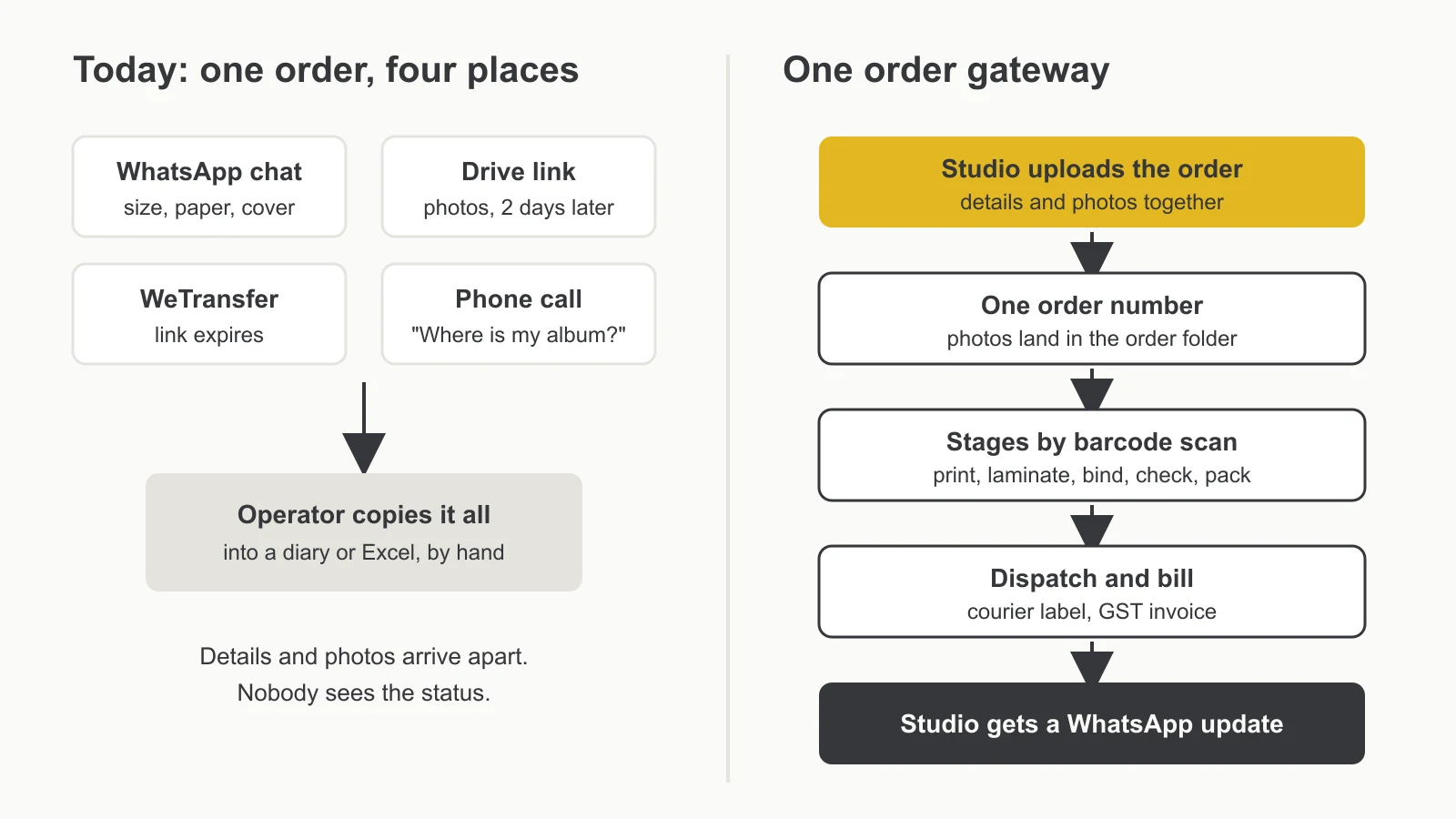
A typical wedding album order arrives in pieces. The studio sends "12x36, 40 sheets, NT paper, leather cover, box and bag" in one message. The photos come 2 days later as a Drive link. The cover photo comes on WhatsApp because the designer forgot it. Then a voice note changes the paper. Your operator has to put that together from four places, and in wedding season the same chat has 5 other orders in it.
Each channel adds its own problem:
- WhatsApp photos are compressed. WhatsApp added a way to send "original quality media as a file" in 2023. Normal and HD photos still go through compression, so a photo forwarded in the chat is not the file you want to print. As a document the file stays original, with a 2GB limit per file according to MacRumors.
- WeTransfer links expire. On the free plan, WeTransfer says links stay active for up to 3 days and each transfer can be up to 3 GB. If nobody downloads the album that week, the studio has to send it again.
- Drive links need access. A link shared as "restricted" sends your operator back to the chat to ask for permission, and the order waits.
- Nobody knows the status. When the order lives in a chat, the only way for a studio to know where its album is, is to call you. Often at night.
What should one album order record hold?
The fix is to decide what a complete order looks like and refuse to start work on anything less. A good order record has the details and the files together, under one order number.
| Field | Why it matters |
|---|---|
| Studio or dealer | Who to bill, who to update, which price card applies |
| Product and size | 12x36 album, 12x30, calendar, prints |
| Spreads or pages | Checked against the files before printing |
| Paper and lamination | One album can use more than one paper |
| Cover, box, bag | Each is a separate print file and a separate job |
| Delivery date and address | Sets the order of work in the busy weeks |
| Photos and design files | Uploaded with the order, not sent later |
| Notes | Anything special, written once, where the operator sees it |
When studios fill this in themselves, your team stops copying details from chats into a diary or Excel. The order number also gives both sides one thing to refer to: "order 2041", not "Sharma ji's album from last Tuesday".
How do you track an album order through production?
Once the order is complete, it needs a status that moves as the album moves. Write down your real stages first. For most album labs they look something like this: received, files checked, printing, lamination, binding, quality check, packing, dispatched.
Then make updating the status easy, or nobody will do it. A printed job card or sticker with a barcode on every order works well. At each stage, someone scans the barcode and the order moves on. The owner can see what is stuck and which orders are late without walking round the floor.
How do you move studios off WhatsApp without losing them?
Studios are your customers, and many have sent orders on WhatsApp for years. Move them over in steps, with help, instead of on a single day.
- Give every studio a simple sign-up. A lab code they type once is easier than a login you have to create for them.
- Send a short video. Two minutes in Hindi showing how to place an order answers most questions before they are asked.
- Pick a start date. "From 1st December, new album orders through the uploader" is clear. Tell studios 14 days before.
- Keep WhatsApp for updates. Studios still get messages, and now they go out on their own: order received, printed, dispatched.
- Help the slow ones. For the first month, enter WhatsApp orders yourself into the new system so nothing is lost while studios get used to it.
What studios get in return is the status of every order and their bills, any time, without calling the lab.
How should order folders be named on the lab PC?
Whatever way orders arrive, the files end up in a folder on a PC next to the printer. A fixed folder pattern saves time every day, because the operator never has to ask which folder belongs to which order.
A pattern that works for many labs puts the order number first, then the studio and the product:
2041_StudioName_12x36_40sheets/
    spreads/      01.jpg, 02.jpg ... 40.jpg
    cover/
    box/
    bag/
Three habits make this pattern hold up in a busy week:
- The order number comes first, so folders sort in the order they arrived.
- Spreads are numbered with two digits (01 to 40), so page 10 never sorts before page 2.
- Cover, box and bag files sit in their own subfolders, because each one prints at its own size and often on a different printer.
When the order system creates the order number and the uploaded photos land in a folder named after it, nobody has to type folder names at all. Prepress tools that read the folder can then pick up the size and page count without guessing.
Photo lab order management with QuickOrders
QuickOrders is the order-to-dispatch system we built for photo and album labs. Studios and dealers sign up on the QuickOrders Uploader with your lab code, upload photos with the order details, see the price and pay online, and track every order. A small Windows app downloads uploaded photos into your folders automatically.
Inside the lab, orders move through your own stages with a barcode scan, with job cards, urgent flags and alerts for late orders. Ready orders are grouped for dispatch with courier labels. Bills, GST e-invoices and payments sit in the same system, and customers get WhatsApp and email updates and payment reminders without anyone typing them. This short Hindi tutorial shows how a studio places an album order with its lab:
When the order folder lands on your PC, Quick PDF Generator can turn it into checked, print-ready album PDFs. See how the pieces fit for photo labs.
A checklist to start this week
You can start fixing order intake before you choose any software:
- Write down what a complete album order must include, using the table above.
- List your production stages as they really happen on your floor.
- Count how many orders came in last week on WhatsApp, Drive and WeTransfer, and how many needed a follow-up message. Even 5 or 10 follow-ups a day add up over 30 days of wedding season.
- Download every WeTransfer link the day it arrives, into a folder named with the order number.
- Ask studios to send photos as documents, not as chat photos, until you have an uploader.
- Pick a start date for the new way of taking orders and tell your studios.
Want to see your own lab's orders in one place? Book a demo of QuickOrders.
Frequently asked questions
Why do photo labs lose orders on WhatsApp?
Order details sit in chat messages while the photos come separately on Drive or WeTransfer, often days apart. Someone has to match them by hand, and a missed message or an expired link becomes a missing order.
Does WhatsApp reduce photo quality for album printing?
Normal and HD photos on WhatsApp are compressed. Sending the photo as a document keeps the original file, and MacRumors reported a 2GB limit per file for that option.
How long do WeTransfer links last?
On the free plan WeTransfer says links stay active for up to 3 days and a transfer can be up to 3 GB. Download the files into the order folder the same day.
What is the best way for studios to send album orders to a lab?
Through one order form or uploader where the studio fills in the album details and uploads the photos together. The lab gets a complete order with a number, and the studio can see its status.