
QR code album for wedding: how labs and studios make it
How a QR code album for wedding orders works, how families scan it, how labs make QR albums at volume, and why some album QR codes fail to scan.
Short answer
- A QR code wedding album is a printed album with a QR code that opens its digital copy. Anyone who scans it with a phone camera sees the full album, page by page, in the browser.
- With eAlbum, each album gets its own QR code, access code and share link. If a phone cannot scan, the family types the access code at view.ealbum.in.
- Labs that print many albums can create the eAlbum and its QR files from order folders with eAlbum Batch, or place the QR on an album page while making the print PDF in Quick PDF Generator.
- Most scan failures come from shiny foil, curved pages near the binding, low contrast or a code printed too small. Test one print before the full run.
A QR code album for wedding orders is a printed album with a small QR code that opens its digital copy. A relative points a phone camera at the code, taps the link, and the full album opens in the browser, page by page, with music. For a lab or studio the work is small: upload the finished pages, get the QR, print it on the album.
This guide covers how the QR album works on the family's side, how labs make QR albums at order volume, and why some album QR codes refuse to scan.
What is a QR code wedding album?
It is two things joined by one code. The first is the printed album you already make: designed spreads, bound and boxed. The second is the digital copy of that album, online, with the same pages in the same order.
The QR code connects them. It usually sits on the inside front cover, the title page, the last page or a printed card in the album box. Each album has its own code, so one family's QR opens their album and nobody else's.
With eAlbum, every album gets three ways in:
- A QR code to print on the album.
- An access code, a short mix of letters and digits that opens the album at view.ealbum.in.
- A share link for WhatsApp or email.
The family rarely needs all three, but a relative whose old phone cannot scan can still type the code, and a cousin abroad can open the forwarded link.
How does a QR code album work for the family?
The family side has three steps, and none of them needs an app.
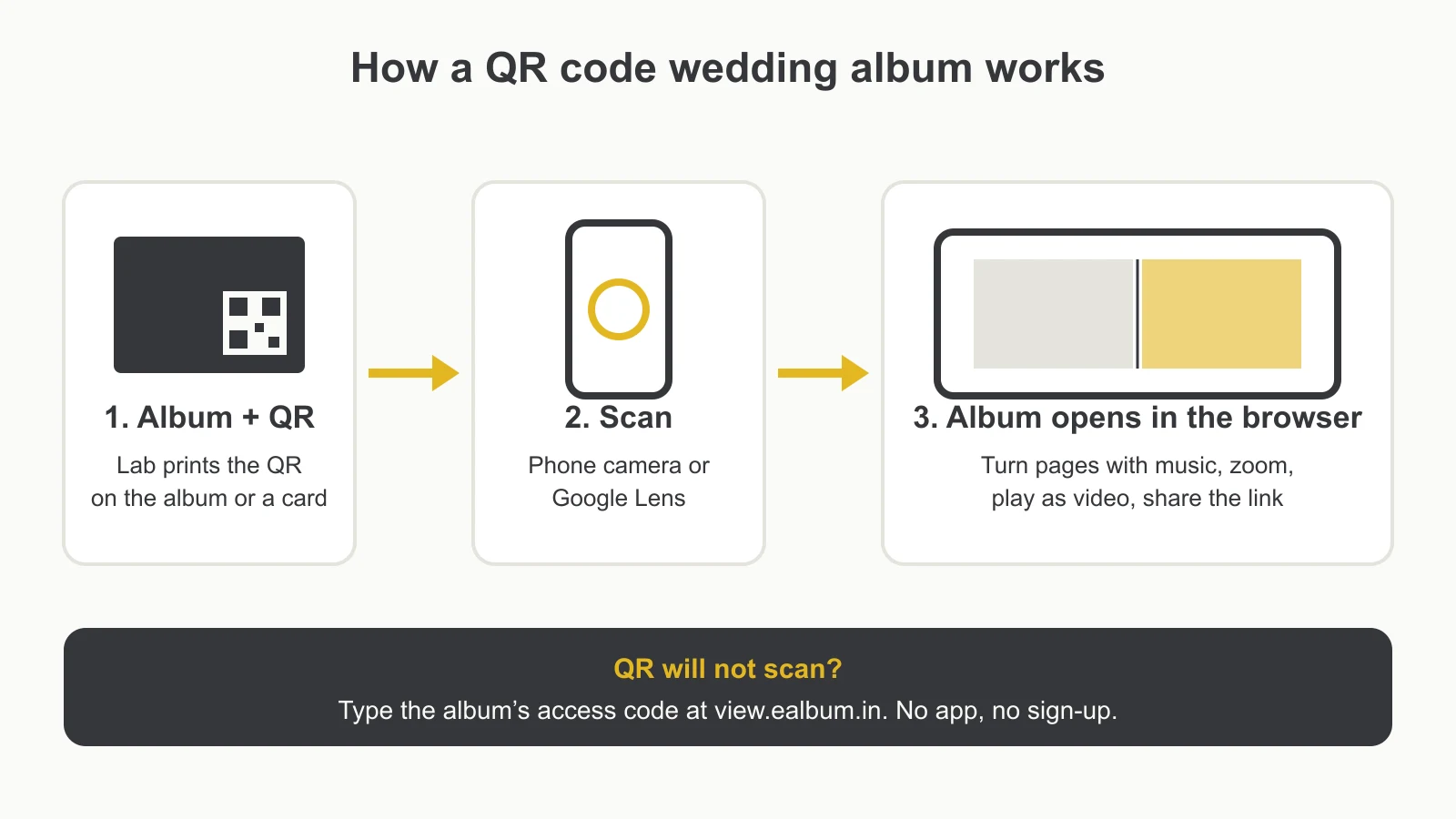
Scanning is built into today's phones. Apple's guide for iPhone says to open the Camera app, frame the code and tap the link that appears. There is also a Code Scanner in Control Center, with a flashlight for dim rooms. Android's own guide lists the camera app, a QR scanner tile in Quick Settings and Google Lens.
Once the eAlbum opens, the relative turns the phone sideways and swipes through the pages with a page-turn sound and background music. They can zoom into a photo, play the pages as a slideshow, or play the whole album as a video. If the album has Alive Print photos, pointing the camera at one of those printed photos plays its video on top of it.
Sharing is one tap. The share button uses the phone's own share sheet, so the link goes to the family WhatsApp group in seconds. When the link is pasted in a chat, the preview shows the album's title and cover.
Why make a QR code album for wedding orders?
For the couple, the reason is simple: one printed album, many relatives. The QR lets every one of them carry the album on a phone.
For a lab or studio there are a few business reasons:
- Your name travels with the album. The studio name, logo and contact sit in the album's info panel, where every relative who opens it can see them.
- You get fewer "send it on WhatsApp" requests, because one link replaces 40 page JPGs sent one by one.
- The family can see the album before the print is ready. The digital copy can go out the day the design is approved.
- It adds to the package without a redesign, since you use the same JPG pages that go to print.
More than 10 lakh QR albums have been created with eAlbum. The first eAlbum on a new account is free, so a studio can try it on one real order before deciding.
How to make QR code albums at lab volume
A studio with 5 or 10 albums a month can create each eAlbum by hand on the website. You create the album, upload and arrange the pages, get the QR and access code, then print and share. Labs that print albums for many studios need something faster. There are three places where eAlbum fits into a lab's workflow.
eAlbum Batch for order folders
eAlbum Batch is a Windows app for labs and busy studios. You point it at the main folder where order folders arrive and mark the orders that need an eAlbum. When you press Start, it keeps watching the folder. For each marked order, it creates the album, uploads the pages and writes a QR image and a QR PDF into that order.
A few details that matter on a busy day:
- It reads page order the way Windows Explorer sorts files, with title pages and covers taken from their own sub-folders.
- It makes resized copies of the pages for upload and leaves your original files untouched.
- A failed order beeps and shows a Windows message, and a Retry Failed button sends it again.
- A QR Sheet PDF puts the QR codes of many finished albums into one file. The page can be 18x12 inch, A4, Letter or a custom size, and you can print the album title and access code under each QR.
The QR design settings include ready presets and colour choices, and the app refuses a design whose contrast may not scan.
Quick PDF Generator: the QR on the album page
If your lab makes album print PDFs in Quick PDF Generator, it can create the eAlbum while it makes the PDF. It places the QR, or an eAlbum banner, on the album page you choose, with options such as the album title, "photo by" name and number, how-to-use text and the order number. The QR is then printed inside the album, with no separate card to lose.
This short Hindi tutorial shows how to set up the eAlbum QR for each album size in Quick PDF Generator:
QuickOrders: the code stays with the order
Labs that run their orders in QuickOrders can keep the eAlbum code on the order. Order emails can carry the eAlbum code, so the studio gets it with its order update and does not have to call the lab to ask for it.
Why do some album QR codes fail to scan?
A QR code has error correction built in. DENSO WAVE, the company that created the QR code, explains that a code can still be read when part of it is dirty or damaged. The level most often used, M, can restore about 15% of the data. That helps with a small scratch. It does not help with a code the camera cannot see clearly.
These are the usual problems on wedding albums:
- Gold or silver foil and glossy lamination throw light back into the camera.
- A code near the binding or across the centre fold sits on a curve and distorts.
- A light code on a dark background, or a pale gold code on cream, often fails. Dark on light works best.
- Codes much smaller than about 2.5 cm can fail on older phones, which are often the grandparents' phones.
- A border pattern or photo touching the edges of the code confuses the scanner, so leave a plain margin around it.
The eAlbum blog has a detailed guide on where to print the QR code on a wedding album, with sizes for the cover, card and box. One habit prevents most reprints. Print one test page on the final paper and finish, then scan it with an Android phone and an iPhone, ideally an older one, before you print the full run.
What to tell the couple at handover
Two minutes at handover saves a lot of phone calls later.
Show them the QR and scan it on their phone in front of them. Tell them that anyone can scan it, without an app, and that the access code works at view.ealbum.in if a phone cannot scan. Send the share link to both families on WhatsApp the same day.
Mention validity once. An eAlbum stays online for a year. The validity can be extended later, and the same QR keeps working after that. Couples who hear this at handover know whom to call.
If you are deciding whether to offer digital albums at all, start with our explainer on what a digital wedding album is. For the file side, see how to make a digital photo album, and for the rest of the album workflow, our photo labs page.
Ready to put a QR on your next album? Create your first eAlbum free at ealbum.in, or read more on the eAlbum product page. For eAlbum support, call +91 81280 66331.
Frequently asked questions
What is a QR code wedding album?
It is a printed wedding album with a QR code on the inside cover, title page or a card. Scanning the code opens the digital copy of the same album on the phone, with music and page turning.
How can the family see a printed album on their phone?
They point the phone camera, or Google Lens, at the QR code and tap the link. The album opens in the browser. With eAlbum they can also type the access code at view.ealbum.in.
How do I make a QR code album?
Export the finished album pages as JPG, upload them as an eAlbum to get its QR and access code, then print the QR on the album or on a card in the album box.
Can a lab make QR codes for many albums at once?
Yes. eAlbum Batch, a Windows app, watches order folders and creates an eAlbum with a QR image and QR PDF for each marked order, and can make one QR sheet PDF for many albums.
Why does the QR code on my album not scan?
Common causes are gold or silver foil, glossy lamination, a code placed across the centre fold, light colours on a dark background and a code smaller than about 2.5 cm.